Finding the best network attached storage for smart home video involves balancing performance, ease of use, and expandability. The Synology DS225+ stands out as the top overall pick for its reliable media management and user-friendly interface. For those seeking budget-friendly options, the Yxk Zero1 offers solid basic storage without breaking the bank, while the UGREEN NAS DXP4800 caters to power users requiring high performance. The main tradeoffs revolve around capacity, complexity, and price — more advanced features often come with higher costs and steeper learning curves. Continue reading for a detailed breakdown of each option to find the best fit for your smart home setup.

Turn the school run and nap time into listening time
- Thousands of audiobooks, podcasts and originals
- Listen on your phone, tablet or Echo — also offline
- Cancel anytime
Complete the kit


Key Takeaways
- Performance and transcoding capabilities are critical for smooth smart home video playback, making higher-end models like the Synology DS225+ stand out.
- Ease of setup and user interface can significantly impact overall satisfaction, especially for non-technical users, favoring brands like Synology.
- Capacity and scalability matter if you plan to expand your smart home camera network over time; multi-bay models offer more flexibility.
- Diskless options like the Yxk Zero1 can reduce upfront costs but require compatible drives and more configuration effort.
- Power efficiency and remote management features are often overlooked but crucial for a hassle-free smart home video experience.
| UGREEN NAS DXP4800 GT 4-Bay for Creators, Tech Enthusiasts and Office Teams |  | Best Overall for High-Performance Smart Home Video Management | Processor: AMD Ryzen Embedded R2514, 4 cores, up to 3.70GHz | RAM: 8GB DDR4, expandable to 64GB | Storage Capacity: Up to 144TB (4 bays, SATA drives up to 32TB each, U.2 NVMe SSDs, M.2 SSDs) | VIEW LATEST PRICE | See Our Full Breakdown |
| UGREEN NAS DH2300 2-Bay Personal Storage for Beginners & Personal Users |  | Best Value for Personal Smart Home Video Storage | Digital Storage Capacity: 64 TB | Hard Disk Interface: Serial ATA | Connectivity Technology: Ethernet, HDMI, SATA, USB | VIEW LATEST PRICE | See Our Full Breakdown |
| Synology DS225+ Private Cloud Media Server – 2-Bay NAS with Intel CPU for Hardware Transcoding | 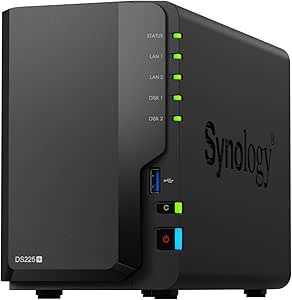 | Best for Media Transcoding & Surveillance in Compact Form | Brand: Synology | Model Number: DS225+ | Number of Bays: 2 | VIEW LATEST PRICE | See Our Full Breakdown |
| UGREEN NAS DXP2800 2-Bay for Advanced Home Users, Remote Workers & Creators |  | Best for Power Users and Creators with Remote Access Needs | Digital Storage Capacity: Up to 80 TB | Hard Disk Interface: Serial ATA | Connectivity Technology: SATA, Ethernet, USB | VIEW LATEST PRICE | See Our Full Breakdown |
| Yxk Zero1 2-Bay Desktop NAS for Home & Personal Storage (Diskless) |  | Best Compact, Private Storage for Home & Small Networks | Brand: Yxk | Number of Items: 1 | UPC: 751580777881 | VIEW LATEST PRICE | See Our Full Breakdown |
| Synology DiskStation DS223j (Diskless, 2-Bay NAS) |  | Best for Entry-Level Home Security and Private Cloud Basics | Model Number: DS223j | Number of Bays: 2 | Warranty: 2 years | VIEW LATEST PRICE | See Our Full Breakdown |
| network attached storage for smart home video | Brand | Warranty |
|---|---|---|
| UGREEN NAS DXP4800 GT 4-Bay fo | — | — |
| UGREEN NAS DH2300 2-Bay Person | — | — |
| Synology DS225+ Private Cloud | Synology | 3 Years |
| UGREEN NAS DXP2800 2-Bay for A | — | — |
| Yxk Zero1 2-Bay Desktop NAS fo | Yxk | 2 Years |
| Synology DiskStation DS223j | Synology | 2 years |
More Details on Our Top Picks
UGREEN NAS DXP4800 GT 4-Bay for Creators, Tech Enthusiasts and Office Teams
This model stands out for its robust hardware powered by an AMD Ryzen Embedded R2514 processor, making it ideal for handling multiple high-demand tasks like 4K media processing, virtual machines, and extensive backups. Compared with the Synology DS225+ which excels in media transcoding, the DXP4800 offers superior raw power and expandability, but it involves a more complex setup and higher initial cost. Its dual 10GbE ports ensure fast data transfer, vital for streaming multiple 4K videos or backing up large files across devices. While drives are not included, the ability to support up to 144TB with various SSD and HDD options makes this perfect for tech-savvy users managing large media libraries or smart home surveillance footage. Built-in surveillance features further enhance its role as a central hub for smart home security.
Pros:- High-performance AMD Ryzen processor for intensive workloads
- Expandable storage up to 144TB with multiple drive options
- Dual 10GbE ports for ultra-fast network connectivity
- Supports virtual machines and Docker for advanced customization
Cons:- Drives not included, requiring additional investment
- Complex setup may be intimidating for beginners
- Non-ECC RAM limits error correction options
Best for: Power users, small businesses, or creators needing high performance, expansive storage, and advanced surveillance integration
Not ideal for: Home users with basic storage needs or beginners who prefer plug-and-play simplicity without complex setup
- Processor:AMD Ryzen Embedded R2514, 4 cores, up to 3.70GHz
- RAM:8GB DDR4, expandable to 64GB
- Storage Capacity:Up to 144TB (4 bays, SATA drives up to 32TB each, U.2 NVMe SSDs, M.2 SSDs)
- Networking:Dual 10GbE ports, support for Link Aggregation
- Connectivity:USB 3.2, USB-C, HDMI, SD card slot
- Security:TLS/SSL, RSA, AES, SHA-512, RAID support
Our verdict“This NAS suits tech-savvy users and professionals demanding high power and flexibility for managing smart home video and media workflows.”
UGREEN NAS DH2300 2-Bay Personal Storage for Beginners & Personal Users
This entry-level NAS shines for its simplicity and affordability, making it suitable for home users looking to securely store and back up personal videos and photos. Unlike the Synology DS225+ which offers hardware transcoding for media streaming, the DH2300 provides straightforward storage with fast transfer speeds up to 125MB/s, ensuring quick backups and access. Its layered security features protect private data, while its compact, dust-resistant design makes it ideal for personal use in varying environments. However, it lacks Wi-Fi support and advanced features like Docker or virtual machines, limiting its flexibility for future expansion. The device’s primary strength lies in providing reliable, easy-to-use storage for those who don’t need extensive media processing or surveillance capabilities.
Pros:- Easy to set up with an intuitive interface
- Supports up to 64TB storage capacity
- Fast data transfer speeds up to 125MB/s
- Enhanced layered security for private data
Cons:- No Wi-Fi support; requires wired Ethernet
- Limited to basic storage and backup features
- No support for Docker or virtual machines
Best for: Home users or small households seeking simple, secure backup for personal videos and photos
Not ideal for: Power users or tech enthusiasts who require advanced networking, virtualization, or media transcoding features
- Digital Storage Capacity:64 TB
- Hard Disk Interface:Serial ATA
- Connectivity Technology:Ethernet, HDMI, SATA, USB
- Additional Features:Dust Resistant, LED Light, Password Protection
- Hard Disk Form Factor:3.5 inches
- Compatible Devices:Desktop, Laptop, Smartphone, Tablet, Television
Our verdict“This NAS is best suited for beginners or families prioritizing simple, secure storage without complex features.”
Synology DS225+ Private Cloud Media Server – 2-Bay NAS with Intel CPU for Hardware Transcoding
The Synology DS225+ excels for users who need reliable media streaming and surveillance support within a compact setup. Its Intel CPU enables hardware transcoding, making it ideal for streaming 4K videos across multiple devices without lag, a feature that surpasses the basic capabilities of the Yxk Zero1. While its 282 MB/s transfer speed supports quick backups and media access, the setup can be challenging for users unfamiliar with Synology’s interface. Limited to 2 bays, it may not meet those with larger storage demands, but its robust data protection, RAID options, and support for up to 30 IP cameras make it a strong choice for smart home security and media needs in small environments.
Pros:- Supports 4K media streaming with hardware transcoding
- Fast transfer speeds up to 282 MB/s
- Multi-layered data protection including RAID and snapshots
- Supports up to 30 IP cameras for smart surveillance
Cons:- Requires technical knowledge for setup and management
- Limited to 2 bays, restricting storage expansion
- Diskless configuration adds initial cost for drives
Best for: Tech-savvy home users or small businesses requiring media transcoding and surveillance integration
Not ideal for: Beginners or users needing large storage capacity or extensive virtual machine support
- Brand:Synology
- Model Number:DS225+
- Number of Bays:2
- Processor:Intel CPU
- Maximum Transfer Speed:282 MB/s
- Warranty:3 Years
Our verdict“This NAS is well-suited for users who prioritize media quality and surveillance features in a compact, reliable package.”
UGREEN NAS DXP2800 2-Bay for Advanced Home Users, Remote Workers & Creators
The DXP2800 is designed for experienced users who require a capable, centralized storage solution with high performance. Its Intel N100 Quad-Core CPU and 8GB DDR5 RAM promise smooth handling of heavy workloads, media streaming, and AI surveillance integration. Compared to the Yxk Zero1, the DXP2800 offers more advanced hardware, supporting up to 80TB of storage and multiple device compatibility, making it suitable for remote teams or creative professionals managing large media files. However, drives are sold separately, which increases initial costs, and the setup might be complex for users unfamiliar with enterprise-grade NAS systems. Its AI-powered surveillance and flexible drive support make it a versatile choice for demanding home environments.
Pros:- Powerful Intel N100 CPU and DDR5 RAM for demanding tasks
- Supports up to 80TB storage with flexible drive options
- AI-powered surveillance capabilities
- Compatible across multiple devices and OS
Cons:- Drives sold separately, adding to initial cost
- Designed for advanced users, which may be overwhelming for novices
- Complex setup process compared to simpler NAS devices
Best for: Advanced home users, remote workers, or creators managing large media assets and requiring AI surveillance
Not ideal for: Beginners or those seeking a simple, ready-to-use storage device without additional setup complexity
- Digital Storage Capacity:Up to 80 TB
- Hard Disk Interface:Serial ATA
- Connectivity Technology:SATA, Ethernet, USB
- Hardware Connectivity:Ethernet, SATA 6.0 Gb/s, USB
- Hardware Platform:x86
- Installation Type:Internal Hard Drive
Our verdict“This NAS is best for experienced users demanding high performance, large storage, and smart surveillance in a centralized home system.”
Yxk Zero1 2-Bay Desktop NAS for Home & Personal Storage (Diskless)
The Yxk Zero1 offers a straightforward, secure storage solution ideal for personal use or small home networks. Its 2-bay design supports RAID configurations for data protection, and its 2.5GbE connectivity ensures faster transfer speeds than standard Gigabit Ethernet. Compared with the more feature-rich Synology DS225+, the Zero1 focuses on simplicity, making it accessible for less technical users. Its support for Docker adds a layer of flexibility for those comfortable with advanced setup, but the 4GB RAM might limit performance under heavy workloads. Since drives are not included, initial setup costs can be higher, but it provides a compact, private cloud environment suitable for personal files and videos.
Pros:- Easy to set up and use, suitable for beginners
- Fast data transfer with 2.5GbE connectivity
- Supports Docker for advanced customization
- Secure private cloud with encryption
Cons:- Hard drives must be purchased separately
- Limited to 4GB RAM, which may restrict heavy workloads
- No included hard drives, increasing initial cost
Best for: Home users or small households seeking easy, secure, private storage with some advanced features
Not ideal for: Power users needing large storage, or those who prefer ready-to-use solutions with included drives
- Brand:Yxk
- Number of Items:1
- UPC:751580777881
- Memory:4GB RAM
- Network Connectivity:2.5GbE
- Supported Features:Docker Support, Private Cloud, File Sharing, Remote Access
- Warranty:2 Years
Our verdict“This NAS offers a compact, private storage solution with advanced features for home users comfortable with DIY setup or Docker customization.”
Synology DiskStation DS223j (Diskless, 2-Bay NAS)
The Synology DiskStation DS223j stands out for its user-friendly setup, making it an excellent choice for those new to NAS devices who want reliable private cloud storage and surveillance support. Unlike the more advanced Synology DS225+, which offers stronger hardware and transcoding capabilities, the DS223j focuses on simplicity and energy efficiency. While this 2-bay model is perfect for basic backups and security camera feeds, its limited capacity means it isn’t suitable for users with growing storage needs. The lack of included drives adds initial cost, but the device’s quiet, energy-efficient operation makes it appealing for 24/7 home use. Compared to larger NAS options, this model emphasizes ease of use over expandability, which may be a drawback for power users.
Pros:- Simple to set up and operate for beginners
- Supports automated backups across multiple devices
- Ideal for home security with surveillance integration
- Quiet and energy-efficient for 24/7 operation
Cons:- Limited to two bays, restricting storage expansion
- Requires some network setup knowledge
- No included drives, additional cost for storage
Best for: Homeowners seeking an easy-to-manage, reliable NAS primarily for security surveillance and simple backups.
Not ideal for: Tech-savvy users or small businesses needing extensive storage capacity or advanced hardware features.
- Model Number:DS223j
- Number of Bays:2
- Warranty:2 years
- Brand:Synology
- UPC:846504004768
- Energy Efficiency:Yes
- Supported Surveillance:Yes
Our verdict“This NAS is best suited for entry-level users prioritizing ease of use and security features over expandability.”

How We Picked
These NAS devices were selected based on their suitability for managing and streaming smart home video content. Key criteria included performance for media transcoding, ease of setup, build quality, expandability, and compatibility with common smart home platforms. We prioritized products that balance user-friendly features with robust hardware, ensuring they cater to both beginners and more advanced users. The ranking reflects a combination of value, versatility, and long-term usability, with higher scores given to models offering better performance and easier integration into existing smart home ecosystems.| network attached storage for smart home video | Brand |
|---|---|
| UGREEN NAS DXP4800 GT 4-Bay fo | — |
| UGREEN NAS DH2300 2-Bay Person | — |
| Synology DS225+ Private Cloud | Synology |
| UGREEN NAS DXP2800 2-Bay for A | — |
| Yxk Zero1 2-Bay Desktop NAS fo | Yxk |
| Synology DiskStation DS223j | Synology |
Factors to Consider When Choosing Best Network Attached Storage For Smart Home Video
Choosing the right NAS for smart home video requires considering several vital factors. Beyond raw storage capacity, factors like transcoding ability, network connectivity, and ease of use greatly influence your experience. Understanding these can help prevent common pitfalls such as underestimating your bandwidth needs or overpaying for features you won’t use. This guide highlights key considerations that will help you make an informed decision suited to your smart home setup.Performance and Transcoding Capabilities
Smart home video often involves streaming multiple camera feeds or high-resolution recordings, which demand strong processing power. Look for NAS units with capable CPUs that support hardware transcoding, enabling smooth playback across various devices without lag. Failing to consider this may result in choppy streams or the need for additional external hardware, increasing complexity and cost.
Ease of Setup and User Interface
A user-friendly interface can save hours of frustration, especially if you’re not tech-savvy. Brands like Synology excel here, offering intuitive apps and seamless integration with smart home platforms. Complex setups can discourage consistent use or lead to misconfigurations, risking data loss or poor performance.
Storage Capacity and Scalability
Assess your current and future storage needs—especially if you plan to add more cameras or higher resolution footage. Multi-bay NAS units provide room for expansion, but they tend to be more expensive upfront. Diskless models save money initially but require investing in compatible drives and ongoing maintenance.
Network Connectivity and Remote Access
Reliable, fast network connections are essential for smooth video streaming and remote access. Look for NAS devices with Gigabit Ethernet or higher, and consider models supporting link aggregation for increased bandwidth. Poor connectivity can lead to lag or incomplete footage retrieval, which defeats the purpose of your smart home system.
Power Efficiency and Reliability
Smart home video systems often run 24/7, so energy-efficient models can reduce ongoing costs. Additionally, features like backup power support or RAID configurations help protect your footage during outages or drive failures. Overlooking these factors might lead to higher energy bills or data loss.
Frequently Asked Questions
Can a NAS handle multiple 4K camera streams simultaneously?
Yes, but only if the NAS has a powerful CPU and hardware transcoding capabilities to process multiple high-resolution streams at once. Models like the Synology DS225+ are designed to handle this load more efficiently. Failing to choose a system with adequate processing power can result in laggy playback or dropped streams, especially if your network bandwidth isn’t sufficient.
Is it better to buy a diskless NAS or one with pre-installed drives?
Choosing a diskless NAS offers flexibility, allowing you to select drives tailored to your storage needs and budget. It also provides a chance to upgrade drives over time as your requirements grow. However, it requires additional initial effort and some technical knowledge to set up. Pre-installed drives can be more convenient but often come at a higher cost and less customization.
How important is remote access for smart home video NAS?
Remote access is vital if you want to monitor footage or manage your system from anywhere. Look for NAS units with secure, easy-to-configure remote access features, including mobile apps and encryption options. Without reliable remote capabilities, your ability to respond promptly to security events diminishes, reducing overall effectiveness.
What should I consider if I want to expand my smart home camera system later?
Opt for a multi-bay NAS with expandable storage options and compatibility with larger drives. Check if the device supports RAID configurations for data redundancy and if it can handle additional cameras without compromising performance. Investing in scalable systems now prevents costly upgrades down the line and ensures smooth growth of your smart home network.
Are higher-priced NAS units worth the extra investment for smart home video?
Higher-priced models typically offer better processing power, more features, and greater reliability, which are beneficial for managing multiple high-resolution streams or complex smart home setups. While they may seem costly initially, their improved performance and longevity can provide better value over time. For basic needs, more affordable options may suffice, but advanced setups benefit from investing in premium hardware.
Conclusion
For users seeking an overall balanced solution, the Synology DS225+ remains the top choice due to its blend of performance, ease of use, and expandability. Budget-conscious buyers or those just starting out will find the Yxk Zero1 offers reliable basic storage without unnecessary complexity. Power users or larger smart home systems should consider the UGREEN NAS DXP4800 for its high performance and advanced features. Beginners aiming for straightforward setup will prefer models like the Synology DS223j for simplicity and solid performance. Carefully matching your specific needs with these options ensures a seamless smart home video experience.