The eufy Security HomeBase 3 is my best overall pick for buyers who want local recording with room to expand, while the Reolink Home Hub Pro stands out for larger camera systems and the Tapo H500 for pairing cameras with sensors. These products differ in storage flexibility, supported devices, and whether a hub is sold alone or bundled with cameras. A larger storage capacity can be useful, but only if the hub works with the cameras you own and fits the way you want to review footage. Some options also depend on a single brand’s ecosystem, while others are designed around a narrower kit. Read on for the full breakdown and help matching a hub to your home.

Turn the school run and nap time into listening time
- Thousands of audiobooks, podcasts and originals
- Listen on your phone, tablet or Echo — also offline
- Cancel anytime
Complete the kit


Key Takeaways
- Expandable storage and device compatibility make the eufy HomeBase 3 a versatile central pick, but its value depends on owning or choosing compatible eufy devices.
- Reolink’s Home Hub Pro models are aimed at broader or larger camera setups; check the specific model’s stated camera support rather than treating the two listings as interchangeable.
- Tapo H500 and H200 serve different needs: H500 targets a camera-and-sensor setup, while H200 adds a built-in chime for compatible devices.
- Camera bundles are not just hubs. The aosu, Night Owl, and solar-powered kits package recording hardware with cameras, which can simplify setup but limit component choice.
- Local storage does not automatically mean every feature works offline. Confirm remote viewing, alerts, storage capacity, and internet-outage behavior for the exact hub and camera combination.
| aosuCortex AI Hub for SolarCam P1 Max System |  | Best for Expandable Local Storage | Compatibility: SolarCam P1 Max System | Camera capacity: Up to 6 cameras | Built-in storage: 32GB encrypted local storage | VIEW ON AMAZON | See Our Full Breakdown |
| eufy Security HomeBase 3 (HomeBase S380) Smart Hub for eufy Devices |  | Best for Large eufy Setups | Compatible devices: Up to 50 eufy devices | Built-in storage: 16GB | Expandable storage: Up to 16TB via external hard drive | VIEW ON AMAZON | See Our Full Breakdown |
| Tapo H500 Smart Home Hub for Cameras and Sensors |  | Best for Mixed Camera-and-Sensor Security | Camera capacity: Up to 16 cameras | Continuous recording: Up to 4 cameras | Sensor capacity: Up to 64 Tapo Sub-G sensors | VIEW ON AMAZON | See Our Full Breakdown |
| 4MP Solar-Powered Wireless Outdoor Security Camera System, 4-Camera Kit |  | Best Solar Kit with Built-In Local Storage | Camera count: 4 | Resolution: 4MP | Local storage: 128GB encrypted | VIEW ON AMAZON | See Our Full Breakdown |
| Night Owl Wi-Fi Security Hub with 4 2K Indoor/Outdoor Cameras |  | Best for Simple Four-Camera Coverage | Camera count: 4 | Video resolution: 2K (4MP) | Camera use: Indoor and outdoor | VIEW ON AMAZON | See Our Full Breakdown |
| eufy Security HomeBase 3 Smart Hub (Renewed) | 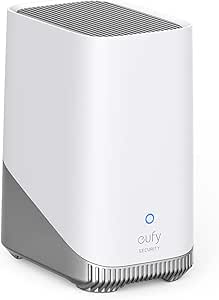 | Best for Expandable eufy Storage | Model: S380 | Video support: 1080p | Storage: Up to 16 TB expandable local storage | VIEW ON AMAZON | See Our Full Breakdown |
| Reolink Home Hub for up to 8 Battery Wi-Fi Cameras and Doorbells |  | Best for Offline Battery-Camera Setups | Device capacity: Up to 8 compatible devices | Compatibility: Most Reolink battery Wi-Fi cameras and doorbells | Storage: Included 64GB microSD card; expandable up to 1 TB | VIEW ON AMAZON | See Our Full Breakdown |
| Solar Security Camera System with Home Hub, 4-Pack, 4MP 360° PTZ Wireless Outdoor Cameras |  | Best Solar Kit with Local Recording | Camera count: 4 | Resolution and view: 4MP; 360° PTZ | Local storage: SD card up to 128GB; card not included | VIEW ON AMAZON | See Our Full Breakdown |
| Arlo Ultra SmartHub |  | Best for Existing Arlo Households | Model: VMB5000-100NAS | Storage capacity: 500 GB | Video capture resolution: 720p | VIEW ON AMAZON | See Our Full Breakdown |
| Reolink Home Hub Pro Security Camera Control and Storage Hub |  | Best for Large Reolink Systems | Camera capacity: Up to 24 devices | Maximum wired connections: 12 | Included storage: 2TB HDD | VIEW ON AMAZON | See Our Full Breakdown |
| Reolink Home Hub Pro for up to 12 Security Cameras |  | Best for Large Reolink Systems | Camera capacity: Up to 12 | Compatibility: Reolink Wi-Fi and PoE cameras and doorbells; excludes 4G cameras | Maximum HDD capacity: 16 TB, 3.5-inch drive (not included) | VIEW ON AMAZON | See Our Full Breakdown |
| eufy Security HomeBase Professional S1 with 4G LTE Backup and Expandable Storage | 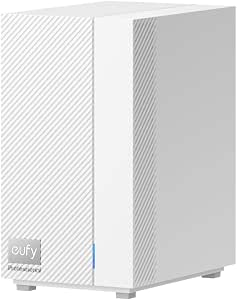 | Best for Outage Resilience | Model number: T9000 | Built-in storage: 32 GB | Expandable storage: Up to 16 TB | VIEW ON AMAZON | See Our Full Breakdown |
| TP-Link Tapo H200 Smart Hub with Built-In Chime |  | Best for Sensor-Heavy Tapo Setups | Device capacity: Up to 64 switches, sensors, or buttons plus 4 cameras or doorbells | Storage: microSD card up to 512 GB; sold separately | Compatible devices: Tapo C420, Tapo C400, Tapo D230, and other Tapo devices | VIEW ON AMAZON | See Our Full Breakdown |
| eufy Security Smart Display E10, 8-Inch Smart Home Hub |  | Best for At-a-Glance Monitoring | Model: T87A0 | Screen size: 8 inches | Storage: 64 GB | VIEW ON AMAZON | See Our Full Breakdown |
| home security hubs with local storage | Connectivity |
|---|---|
| aosuCortex AI Hub for SolarCam | Ethernet |
| eufy Security HomeBase 3 | 2.4 GHz Wi-Fi |
| Tapo H500 Smart Home Hub for C | Wi-Fi or wired connection |
| 4MP Solar-Powered Wireless Out | — |
| Night Owl Wi-Fi Security Hub w | Wi-Fi |
| eufy Security HomeBase 3 Smart | Wired; power connector and Ethernet |
| Reolink Home Hub for up to 8 B | 2.4 GHz and 5 GHz Wi-Fi |
| Solar Security Camera System w | — |
| Arlo Ultra SmartHub | Wired and wireless (Wi-Fi, Zigbee) |
| Reolink Home Hub Pro Security | Wi-Fi 6 and Ethernet |
| Reolink Home Hub Pro for up to | Wi-Fi 6 |
| eufy Security HomeBase Profess | Wi-Fi and PoE |
| TP-Link Tapo H200 Smart Hub wi | — |
| eufy Security Smart Display E1 | — |
More Details on Our Top Picks
aosuCortex AI Hub for SolarCam P1 Max System
The aosuCortex stands out for buyers who want local storage that can grow substantially: it starts with 32GB built in and supports expansion up to 16TB. Its capacity for six cameras and AI features such as face recognition, behavior detection, and daily summaries make it a focused hub for a SolarCam P1 Max setup. Compared with the eufy HomeBase 3, which supports a much larger device ecosystem, this hub is the more limited choice for camera count and compatibility. Its advantage is the larger built-in storage figure and a clear expansion path. The tradeoff is firm: it is designed for the SolarCam P1 Max system, so buyers with other camera brands or plans to mix devices should look elsewhere. Ethernet connectivity also means it needs a wired network connection.
Pros:- 32GB of built-in encrypted local storage, expandable up to 16TB
- Supports up to six compatible cameras
- AI features include face recognition and behavior detection
- Offers daily security summaries and optional app-based sharing
Cons:- Compatibility is limited to the SolarCam P1 Max system
- Ethernet connection requires a wired network location
Best for: SolarCam P1 Max owners who want encrypted local recording and room to expand storage without relying on cloud service.
Not ideal for: Buyers building a mixed-brand setup or needing a hub for more than six cameras; this model is designed for the SolarCam P1 Max system.
- Compatibility:SolarCam P1 Max System
- Camera capacity:Up to 6 cameras
- Built-in storage:32GB encrypted local storage
- Expandable storage:Up to 16TB
- Connectivity:Ethernet
- Weight:784 g
- Included components:aosuCortex, power adapter, Ethernet cable
- Model number:H2E0.WAUS01PJ1
Our verdict“Choose the aosuCortex if you own the SolarCam P1 Max system and want a substantial path to expanded local storage.”
eufy Security HomeBase 3 (HomeBase S380) Smart Hub for eufy Devices
The HomeBase 3 earns its place for households building around a broad eufy device network: it supports up to 50 compatible cameras, doorbells, and sensors, far beyond the six-camera limit of the aosuCortex. Its 16GB of built-in storage can be expanded to 16TB with an external hard drive, giving larger installations a way to keep recordings local rather than depend on monthly storage plans. BionicMind facial recognition, daily security briefings, encryption, and a 100dB siren add functions beyond storage. The tradeoffs are ecosystem lock-in and the need to buy an external drive for expanded capacity. Setup may also take more effort than a smaller, focused hub such as the Tapo H500, so this makes most sense for buyers ready to configure a wider eufy system.
Pros:- Supports up to 50 compatible eufy cameras, doorbells, and sensors
- 16GB built-in storage with expansion up to 16TB using an external hard drive
- Facial recognition and daily security briefings can help sort alerts
- Built-in 100dB siren and AES-256-GCM/ECC-256 encryption
Cons:- Expanded storage requires a separately purchased external hard drive
- Compatibility is limited to the eufy ecosystem
- Setup may be challenging for less technical users
Best for: eufy households adding several cameras, doorbells, and sensors who want centralized local storage and room to expand.
Not ideal for: Buyers with non-eufy devices, a small plug-and-play setup, or no interest in configuring an external hard drive.
- Compatible devices:Up to 50 eufy devices
- Built-in storage:16GB
- Expandable storage:Up to 16TB via external hard drive
- Connectivity:2.4 GHz Wi-Fi
- Security:AES-256-GCM/ECC-256 encryption
- Alarm:100dB siren
- Wattage:6 watts
- Weight:1.5 pounds
Our verdict“Pick the HomeBase 3 if you have a growing eufy system and value high device capacity over cross-brand compatibility.”
Tapo H500 Smart Home Hub for Cameras and Sensors
The Tapo H500 is a strong fit for buyers who want one hub for cameras and a larger sensor network. It supports up to 16 Tapo cameras and 64 Tapo Sub-G sensors, while the eufy HomeBase 3 offers a higher overall device count but stays within eufy’s ecosystem. Tapo’s 16GB built-in storage supports local recording, with a separately sold 2.5-inch SATA drive available for expansion up to 16TB. The hub can continuously record up to four cameras, a useful distinction for households that want ongoing footage from key views rather than every camera. HDMI live viewing, two-way audio, WPA3 encryption, and a 110dB alarm add practical control options. The main compromises are the separate drive purchase and the four-camera ceiling for continuous recording.
Pros:- Connects up to 16 Tapo cameras and 64 Tapo Sub-G sensors
- Supports local recording with 16GB built in and expansion up to 16TB
- HDMI output supports up to four live camera views on a larger screen
- Includes facial recognition, two-way audio, WPA3 encryption, and a 110dB alarm
Cons:- Continuous recording is limited to four cameras
- The SATA hard drive or SSD for expanded storage is sold separately
Best for: Tapo households combining several cameras with door, motion, or other compatible Sub-G sensors, especially those who want HDMI viewing.
Not ideal for: Buyers who need continuous recording from more than four cameras or expect expanded storage to be included.
- Camera capacity:Up to 16 cameras
- Continuous recording:Up to 4 cameras
- Sensor capacity:Up to 64 Tapo Sub-G sensors
- Built-in storage:16GB
- Expandable storage:2.5-inch SATA HDD or SSD, up to 16TB; sold separately
- HDMI:Supports up to 4 live views
- Security:WPA3 encryption
- Alarm volume:110dB
- Connectivity:Wi-Fi or wired connection
Our verdict“Choose the Tapo H500 if your priority is coordinating Tapo cameras and sensors with local recording and an HDMI viewing option.”
4MP Solar-Powered Wireless Outdoor Security Camera System, 4-Camera Kit
This four-camera kit is the most self-contained option here for outdoor monitoring: it combines solar-powered cameras with 128GB of encrypted local storage, so buyers do not need to add a separate hub drive to start recording locally. Its 355-degree pan-and-tilt coverage, motion tracking, human detection, and color night vision aim to cover more of a yard with fewer fixed blind spots. Compared with the Night Owl system, it avoids plug-in camera power, while Night Owl has a smaller 64GB storage pool and fixed camera positioning based on the supplied details. The tradeoff is that this is a bundled camera system rather than a flexible, expandable hub for mixed devices. App setup and Wi-Fi are required, and tracking must be enabled in the app.
Pros:- Includes 128GB encrypted local storage
- Solar panels and 8000mAh batteries reduce routine charging
- 355-degree pan-and-tilt coverage with motion tracking and AI human detection
- 4MP video, color night vision, and two-way audio
Cons:- Requires Wi-Fi and app setup for remote viewing and playback
- Auto-tracking is disabled by default and must be enabled in the app
- The supplied details do not specify an expandable storage path or compatibility with other camera systems
Best for: Homeowners monitoring outdoor areas who want solar-powered cameras, local recording included, and app-based viewing.
Not ideal for: Buyers seeking a standalone hub for other camera brands, wired network independence, or a system that does not rely on app setup.
- Camera count:4
- Resolution:4MP
- Local storage:128GB encrypted
- Power:Solar panel with 8000mAh battery
- Solar panel output:5W
- Wi-Fi:2.4GHz and 5GHz
- Night vision range:Up to 65 ft
- Coverage:355° pan-and-tilt
- Water resistance:IP66
Our verdict“Choose this kit for solar-powered outdoor coverage with local storage included, but skip it if you need a flexible hub for an existing camera ecosystem.”
Night Owl Wi-Fi Security Hub with 4 2K Indoor/Outdoor Cameras
Night Owl makes the most sense for buyers who want a straightforward four-camera system with local recording included, rather than a hub built to manage a large smart-home network. The 64GB storage and 2K video are ready to serve several indoor or outdoor views, and smartphone access provides remote viewing and motion alerts without a mandatory monthly subscription. Compared with the solar-powered four-camera kit, Night Owl’s cameras need plug-in power but avoid dependence on solar exposure and battery charging. It also offers less storage than that kit’s 128GB, and its cameras are not described with pan-and-tilt coverage or tracking. The defining tradeoff is placement: plug-in cameras can suit buildings with accessible outlets, but they limit options for distant or hard-to-wire locations.
Pros:- Four cameras cover multiple indoor and outdoor areas
- 2K (4MP) video resolution
- Includes 64GB of local storage with no mandatory monthly subscription
- Supports app-based remote viewing and motion alerts
Cons:- Cameras require plug-in power, limiting placement flexibility
- Remote features depend on Wi-Fi and the Night Owl app
- The supplied details do not state an expandable storage option
Best for: Households that want four indoor or outdoor views, local recording, and accessible outlets near each camera location.
Not ideal for: Buyers needing solar-powered placement, large expandable storage, or a hub with a broad sensor ecosystem.
- Camera count:4
- Video resolution:2K (4MP)
- Camera use:Indoor and outdoor
- Power:Plug-in
- Local storage:64GB
- Connectivity:Wi-Fi
- Features:Motion alerts, remote viewing, expandable camera coverage
Our verdict“Pick Night Owl for a simple four-camera setup with local storage if plug-in power is available where you need coverage.”
eufy Security HomeBase 3 Smart Hub (Renewed)
The renewed eufy HomeBase 3 suits eufy households that want substantial local-storage headroom without a monthly fee. Its support for up to 16 TB of expandable storage is far beyond the Reolink Home Hub’s 1 TB limit, giving a growing camera setup more room for recordings. BionicMind facial recognition adds a way to distinguish familiar people, though the supplied alert type is motion-only, so buyers seeking a wider range of alert categories should check the exact system behavior before choosing it. Unlike the Reolink Home Hub Pro, this model is limited to compatible eufy devices rather than a larger mixed Wi-Fi and PoE camera lineup. It also needs a wired connection, and its 90-day limited warranty reflects its renewed condition.
Pros:- Expandable local storage supports up to 16 TB
- BionicMind AI facial recognition is included
- No monthly fee is required
- Ready to use out of the box
Cons:- Requires a wired connection
- Alerts are motion-only
- Renewed unit has a 90-day limited warranty
Best for: Existing eufy users who want expandable local recording, facial recognition, and no monthly storage fee.
Not ideal for: Buyers who want a wireless hub, broader camera-brand compatibility, or a longer warranty than the 90-day renewed-unit coverage.
- Model:S380
- Video support:1080p
- Storage:Up to 16 TB expandable local storage
- Compatibility:eufy Security products and eufy Edge Security Center
- Connectivity:Wired; power connector and Ethernet
- Alert type:Motion only
- Dimensions:4.33 x 3.09 x 5.65 inches
- Condition and warranty:Renewed; 90-day limited warranty
Our verdict“Choose this renewed hub if you already use eufy devices and value large expandable local storage over wireless setup or broad compatibility.”
Reolink Home Hub for up to 8 Battery Wi-Fi Cameras and Doorbells
For a small Reolink battery-camera system, this hub’s strongest case is local recording that can continue offline. It centralizes management for up to eight compatible cameras and doorbells, and the included 64GB microSD card means storage is ready to use; expansion goes up to 1 TB. That is a simpler starting point than the Reolink Home Hub Pro, which offers much more capacity and support for wired devices but takes more space and is aimed at larger systems. The tradeoff here is a firm brand and device boundary: third-party cameras are not supported, and compatibility is limited to most Reolink battery Wi-Fi models. Buyers should check their exact camera model before purchasing. AES-128 encryption and operation without a subscription add appeal for a focused setup.
Pros:- Centralizes up to eight compatible cameras and doorbells
- Supports local recording and offline operation
- Includes a 64GB microSD card and supports expansion up to 1 TB
- No subscription is required
Cons:- Does not support third-party devices
- Compatibility is limited to most Reolink battery Wi-Fi cameras and doorbells
- Storage expansion requires a microSD card
Best for: Reolink owners building a modest battery-camera or doorbell system who want local recording to keep working when Wi-Fi is down.
Not ideal for: Households mixing camera brands, using wired PoE cameras, or planning a system larger than eight compatible Reolink battery devices.
- Device capacity:Up to 8 compatible devices
- Compatibility:Most Reolink battery Wi-Fi cameras and doorbells
- Storage:Included 64GB microSD card; expandable up to 1 TB
- Video capture resolution:2160p
- Offline operation:Supported
- Encryption:AES-128
- Connectivity:2.4 GHz and 5 GHz Wi-Fi
- Power input:DC 12V/1A
Our verdict“Pick this hub for a compact Reolink battery-camera system where offline local recording matters more than broad compatibility or high capacity.”
Solar Security Camera System with Home Hub, 4-Pack, 4MP 360° PTZ Wireless Outdoor Cameras
This bundle is for buyers who want cameras and a hub together, with solar power reducing the need to run power cables to outdoor positions. Its four 4MP cameras add 360° pan-and-tilt control, color night vision up to 65 feet, and AI human detection with tracking—features that make it more camera-focused than the standalone Reolink Home Hub. The hub records locally to an optional SD card up to 128GB, but the card is not included, so local storage requires an extra component. Unlike the Reolink Home Hub Pro, this system is capped at four cameras per hub and depends on Wi-Fi; it cannot use a cellular SIM connection. Choose it for solar-powered coverage and camera features, not for large-scale storage capacity or internet-independent connectivity.
Pros:- Solar panels and rechargeable batteries reduce the need for wired camera power
- Four 4MP cameras offer 360° pan-and-tilt control
- Color night vision reaches up to 65 feet
- AI human detection, auto-tracking, and two-way audio are included
Cons:- SD card is not included
- Requires Wi-Fi and does not support a cellular SIM connection
- Each hub supports only four cameras
Best for: Homeowners wanting a ready-matched four-camera outdoor kit with solar power, pan-and-tilt coverage, and optional local SD storage.
Not ideal for: Buyers who need cellular connectivity, more than four cameras per hub, or included high-capacity storage.
- Camera count:4
- Resolution and view:4MP; 360° PTZ
- Local storage:SD card up to 128GB; card not included
- Power:5W solar panel and 8000mAh rechargeable battery
- Wi-Fi:2.4 GHz and 5 GHz dual-band Wi-Fi 6
- Night vision:Color, up to 65 feet
- Weather resistance:IP66
- Hub capacity:Up to 4 cameras
Our verdict“Choose this bundle for solar-powered outdoor coverage and camera-side features if a four-camera limit and separately supplied SD card fit your plan.”
Arlo Ultra SmartHub
The Arlo Ultra SmartHub makes the most sense as a central connection point for compatible Arlo cameras, rather than as a flexible storage platform for a new mixed-brand system. It supports local recording and a broad selection of specified Arlo Pro, Essential, Ultra, Floodlight, and Video Doorbell devices. That gives existing Arlo owners a clearer upgrade path than the eufy HomeBase 3, which is tied to eufy products. The tradeoff is that the listed storage capacity is 500 GB, well below the expandable capacity of the eufy hub or Reolink Home Hub Pro. The stated video capture resolution is 720p, which is also less than the 1080p support listed for the eufy model. Check compatibility with the exact camera generation before buying; this hub is not a universal recorder.
Pros:- Supports local recording
- Compatible with a range of specified Arlo cameras and doorbells
- Designed for long-range connectivity
- Connects compatible Arlo cameras through a home router
Cons:- Listed storage capacity is 500 GB
- Video capture resolution is listed as 720p
- Works only with select Arlo devices
Best for: Current Arlo owners with compatible cameras who want a dedicated hub that supports local recording and long-range connectivity.
Not ideal for: Buyers seeking high-capacity expandable storage, higher listed video resolution, or support for cameras outside the specified Arlo lineup.
- Model:VMB5000-100NAS
- Storage capacity:500 GB
- Video capture resolution:720p
- Connectivity:Wired and wireless (Wi-Fi, Zigbee)
- Compatible devices:Select Arlo Pro, Essential, Ultra, Floodlight, and Video Doorbell models
- Dimensions:4.78 x 5.88 x 2.94 inches
- Included items:Smart Hub, Ethernet cable, power adapter, quick start guide, and window decal
- Enclosure material:Plastic
Our verdict“Choose the Arlo Ultra SmartHub if you already own compatible Arlo devices and accept its 500 GB capacity and 720p specification.”
Reolink Home Hub Pro Security Camera Control and Storage Hub
Among these picks, the Reolink Home Hub Pro is the clearest choice for a large local-recording system: it supports up to 24 compatible cameras and doorbells, includes a 2TB HDD, and can expand to 16TB. That capacity puts it well ahead of the eight-device Reolink Home Hub and its microSD-based storage, while support for up to 12 wired connections suits installations that mix Wi-Fi and PoE cameras. Wi-Fi 6, AES-128 encryption, and a 120dB siren round out a feature set built for central control, not a minimal setup. The limits are meaningful: it supports Reolink devices only, excludes 4G LTE and third-party cameras, and microSD cannot save videos while an HDD is installed. Its larger footprint and corded power also call for a planned indoor location.
Pros:- Supports up to 24 compatible cameras and doorbells
- Includes a 2TB HDD and supports expansion up to 16TB
- Supports up to 12 wired connections alongside Wi-Fi 6
- Includes AES-128 encryption and a 120dB siren
Cons:- Supports Reolink cameras only and excludes 4G LTE models
- MicroSD cannot save videos when an HDD is installed
- Corded power and larger dimensions require a planned indoor placement
Best for: Reolink users managing many Wi-Fi or PoE cameras who want an included hard drive and room to expand local storage.
Not ideal for: Small systems, mixed-brand camera owners, or buyers using 4G LTE cameras who do not need a 2TB drive or capacity for up to 24 devices.
- Camera capacity:Up to 24 devices
- Maximum wired connections:12
- Included storage:2TB HDD
- Maximum HDD storage:16TB
- Video resolution:Up to 8K
- Connectivity:Wi-Fi 6 and Ethernet
- Compatibility:Reolink Wi-Fi and PoE cameras; excludes 4G LTE and third-party cameras
- Siren:120dB
- Dimensions:7.28 x 5.24 x 8.74 inches
Our verdict“Choose the Home Hub Pro for a sizable Reolink installation that needs included HDD storage and room to expand, but skip it for mixed-brand or 4G systems.”
Reolink Home Hub Pro for up to 12 Security Cameras
The Reolink Home Hub Pro is the clearest fit here for buyers building a larger camera network around local recording: it manages up to 12 compatible cameras and doorbells and supports a separately purchased hard drive up to 16 TB. That capacity gives you room to keep more footage on-site than the Tapo H200, which supports just four cameras or doorbells and a 512 GB microSD card. Reolink also offers an SD-card option for a simpler setup, plus HDMI output for viewing on a connected display. The tradeoff is that the substantial HDD capacity is not included, and the hub excludes 4G cameras. Compared with the eufy HomeBase Professional S1, it prioritizes camera capacity and stated 8K capture support over cellular backup and battery-powered outage coverage.
Pros:- Manages up to 12 compatible Reolink cameras and doorbells
- Supports a separately purchased hard drive up to 16 TB or an SD card up to 512 GB
- Local recording without monthly subscription fees
- Wi-Fi 6, HDMI output, and AES-128 encryption
Cons:- The 3.5-inch hard drive is sold separately
- Not compatible with Reolink 4G cameras
- Limited to compatible Reolink devices
Best for: Households with several compatible Reolink Wi-Fi or PoE cameras that want expandable local recording and no monthly storage subscription.
Not ideal for: Owners of 4G cameras or shoppers who want a ready-to-record hub with a hard drive included.
- Camera capacity:Up to 12
- Compatibility:Reolink Wi-Fi and PoE cameras and doorbells; excludes 4G cameras
- Maximum HDD capacity:16 TB, 3.5-inch drive (not included)
- Maximum SD card capacity:512 GB
- Connectivity:Wi-Fi 6
- Video capture resolution:8K
- Encryption:AES-128
- Video output:HDMI
- Warranty:2 years
Our verdict“Choose the Reolink Home Hub Pro if you have a growing Reolink camera system and value high-capacity local recording more than built-in outage backup.”
eufy Security HomeBase Professional S1 with 4G LTE Backup and Expandable Storage
The eufy HomeBase Professional S1 is the standout choice when local footage matters during more than ordinary internet and power conditions. Its built-in battery lasts up to 24 hours, while 4G LTE backup can help maintain connectivity during an internet outage. It starts with 32 GB of local storage and can expand to 16 TB, giving it a more resilient setup than the Reolink Home Hub Pro, which offers greater stated camera capacity but no listed battery or cellular backup. The S1 connects to select eufy cameras, doorbells, and sensors over Wi-Fi or PoE. Its limits are practical: compatibility is restricted to select eufy devices, and stable operation requires an Ethernet connection to the router. The listed video capture resolution is 1080p, so storage resilience—not resolution—is its defining advantage.
Pros:- 4G LTE backup connectivity for internet outages
- Built-in battery provides up to 24 hours of backup power
- Local storage starts at 32 GB and expands up to 16 TB
- Supports compatible devices over Wi-Fi or PoE
Cons:- Compatible with select eufy devices rather than cameras from multiple brands
- Requires an Ethernet connection to the router for stable operation
- Listed video capture resolution is 1080p
Best for: Homeowners with compatible eufy cameras who want local recording to keep running through internet or power interruptions.
Not ideal for: Households using mixed camera brands, or buyers unable to connect the hub to their router with Ethernet.
- Model number:T9000
- Built-in storage:32 GB
- Expandable storage:Up to 16 TB
- Backup connectivity:4G LTE
- Backup battery life:Up to 24 hours
- Connectivity:Wi-Fi and PoE
- Video capture resolution:1080p
- Compatible devices:Select eufy PoE cameras, eufyCams, battery doorbells, and sensors
Our verdict“Pick the HomeBase Professional S1 if outage continuity is a higher priority than broad device compatibility or the Reolink hub’s larger camera capacity.”
TP-Link Tapo H200 Smart Hub with Built-In Chime
The Tapo H200 makes more sense as a device-and-alert hub than as a high-capacity video recorder. It pairs with up to 64 switches, sensors, or buttons, while local camera recordings require a separately purchased microSD card capped at 512 GB and are limited to compatible devices. That is a much lighter storage setup than the 16 TB expansion supported by the Reolink Home Hub Pro or eufy HomeBase Professional S1. Where Tapo stands apart is its built-in chime, adjustable up to 90 dB, alongside motion and visitor alerts and Alexa and Google Home support. This can suit a household that wants a loud, integrated alert and many sensors without a larger recording hub. Check regional Sub-1G compatibility and the 2.4 GHz Wi-Fi requirement before choosing it.
Pros:- Connects up to 64 switches, sensors, or buttons
- Built-in adjustable chime reaches up to 90 dB
- Supports local video storage on a microSD card up to 512 GB
- Works with Amazon Alexa and Google Home
Cons:- microSD card is sold separately
- Camera and doorbell capacity is limited to four
- Sub-1G band compatibility varies by region
Best for: Tapo households that use many sensors or buttons and want a built-in chime plus basic local recording for compatible cameras or doorbells.
Not ideal for: Buyers who need long-term, high-capacity local video storage or want a hub built primarily around managing many cameras.
- Device capacity:Up to 64 switches, sensors, or buttons plus 4 cameras or doorbells
- Storage:microSD card up to 512 GB; sold separately
- Compatible devices:Tapo C420, Tapo C400, Tapo D230, and other Tapo devices
- Maximum chime volume:90 dB
- Wireless protocol:Sub-1G band; regional compatibility varies
- Wi-Fi requirement:2.4 GHz
- Voice assistants:Amazon Alexa and Google Home
Our verdict“Choose the Tapo H200 for a sensor-heavy Tapo setup with a useful built-in chime, not for large-scale video archiving.”
eufy Security Smart Display E10, 8-Inch Smart Home Hub
The eufy Smart Display E10 puts local footage in a more immediate, screen-first format: its 8-inch touchscreen can show up to four live camera feeds, with voice alerts for events such as doorbell rings, door unlocks, or camera activity. It also stores event footage locally for playback and offers daily security summaries when paired with HomeBase 3. That makes it a different kind of pick from the Reolink Home Hub Pro, which is built to manage and record a larger camera network rather than provide a dedicated viewing screen. The E10’s main compromise is its dependence on the eufy ecosystem: recognition features and daily reports rely on HomeBase 3, and it is not a substitute for a high-capacity storage hub. Choose it to check alerts and feeds conveniently, not to anchor a mixed-brand or large-scale recording system.
Pros:- Displays up to four live camera feeds at once
- Voice alerts can bring up live video for specified security events
- Stores event footage locally for playback
- Daily security summaries include facial and package recognition when paired with HomeBase 3
Cons:- Recognition features and daily reports rely on HomeBase 3
- The listed storage is 64 GB, far below the expandable capacity of the Reolink Home Hub Pro and eufy HomeBase Professional S1
- Designed as a viewing and alert display rather than a general-purpose camera-management hub
Best for: eufy households that want a dedicated display for checking several live feeds and reviewing locally stored event clips.
Not ideal for: Buyers seeking a standalone, expandable recorder, or those who do not own compatible eufy devices and HomeBase 3.
- Model:T87A0
- Screen size:8 inches
- Storage:64 GB
- Live camera feeds:Up to four
- Weight:2.46 lbs
- Included components:5V/2A adapter, charging station, Smart Display E10, USB-C charging cable, and wall mount
- Battery:Lithium-ion; 1 AAA battery included
Our verdict“Choose the E10 if a convenient screen for eufy live feeds and event playback matters more than expandable, high-capacity local recording.”

How We Picked
I ranked these 14 options around the job implied by the search: recording and managing home security footage locally. I gave more weight to clearly described local-storage capability, the ability to add or expand storage, compatibility with cameras and sensors, and the practical role of each hub. I also separated standalone hubs from complete camera kits and display-style controllers, since those serve different buyers.
The order favors flexible hubs that can anchor a wider setup, followed by models with a more specialized but useful fit. A higher position does not mean a product suits every household: brand compatibility, device limits, and bundled hardware can matter more than headline capacity. Where two listings appear to describe closely related models, I treat them as distinct products and recommend checking the exact model and supported devices before buying.
Factors to Consider When Choosing Home Security Hubs With Local Storage
Choosing a local-storage hub is less about picking the biggest number on a spec sheet and more about matching the hub to your cameras, footage habits, and network. I would settle the compatibility and backup questions before comparing convenience features.
Match the Hub to Your Cameras Before You Buy
A hub can offer local recording and still be useless with a camera that it does not support. Start by listing the exact camera and doorbell models you already own, then check the hub’s compatibility list for those models rather than relying on a brand name alone. Compatibility can vary between generations and product families. If you are starting from scratch, choosing one ecosystem may make setup simpler, but it also narrows future replacements and add-ons. Mixing brands can be appealing, yet a hub that only connects devices through a limited integration may not manage recordings as smoothly as a native match. Treat compatibility as a pass-or-fail requirement before weighing extra features.
Work Out How Much Storage Your Footage Needs
Storage needs depend on how many cameras record, how often motion triggers clips, and whether you keep continuous footage or event clips. A quiet entryway and a busy driveway can fill storage at very different rates, even with similar camera counts. Check whether the hub includes storage, accepts an upgrade, or requires a separately purchased drive or card. Also find out whether older recordings are automatically overwritten and whether important clips can be exported before that happens. Buyers often focus on maximum capacity without asking how the system handles a full drive. Plan around the retention period you actually want, not a theoretical maximum.
Separate Local Recording From Internet-Free Operation
Local storage means footage can be saved on hardware in your home, but it does not guarantee that every function works when the internet is down. Remote viewing, push alerts, cloud services, and account sign-in may still rely on an internet connection. Ask what you can do from the local network during an outage and what stops working away from home. If outages are a concern, look for clearly described network or cellular backup and check which services it covers. A local recording hub can reduce dependence on cloud storage without making a system fully self-contained. This distinction matters most for buyers who expect uninterrupted alerts or off-site access.
Decide Whether You Want a Hub Alone or a Camera Kit
A standalone hub makes sense when you already own compatible cameras or want to choose each camera separately. A bundled system can be easier for a first installation because its cameras and recorder are intended to work together, but the bundle may leave less room to mix brands or upgrade one component at a time. Compare the number and type of cameras included with the coverage areas you need. Solar-powered kits may reduce routine charging, though placement and sunlight still affect performance. Avoid buying a kit just because it includes several cameras if its hub cannot support the expansion you expect later. The right format depends on whether simplicity or flexibility matters more.
Check Device Limits and the Cost of Expanding
Camera limits matter even if a small setup is all you need today. A hub that supports only a few devices may force a replacement if you later add a doorbell, indoor camera, or another access point. Check whether published limits count cameras alone or include other connected devices such as sensors. Expansion can also involve extra storage, a subscription, or a particular camera family, so count those requirements before settling on a hub. Paying more for a larger system is sensible only if you expect to use its added capacity or broader support. For a small, fixed setup, a more focused hub may be simpler and easier to manage.
Look at Daily Use, Not Just Recording Features
Think through how you will find footage after an alert: from a phone, a local display, or a computer. A hub with a screen or built-in chime may suit someone who wants visible, audible feedback at home, while a compact storage hub may be a better fit when the phone is the main control point. Review how the system labels events, searches clips, and handles notifications; local footage is less useful if it takes too long to find the right moment. Also check power, placement, and network requirements for the hub itself. A convenient interface cannot compensate for weak camera placement or a hub installed where its connection is unreliable. Prioritize the routine you will actually use.
Frequently Asked Questions
Will a local-storage security hub keep recording if my internet goes out?
It may continue saving footage to local storage, but the answer depends on the hub and camera connection. Internet outages can disable remote viewing, cloud features, and phone alerts even when local recording remains available. Check whether the cameras communicate directly with the hub over your home network and what the manufacturer says happens during an outage. If cellular backup is offered, confirm whether it supports alerts and remote access or only a limited set of functions. Do not assume that “local storage” means the whole security system works without internet.
Can I use one hub with cameras from different brands?
Usually, you should plan around the hub’s listed compatible devices rather than expect universal camera support. Some hubs are built for a single brand’s ecosystem, and support can vary across camera generations within that brand. A shared smart-home standard or app integration does not always mean the hub can store and manage another brand’s video. Before buying, check the exact camera model and confirm that recording, playback, and alerts are supported—not just basic device connection. If you want a mixed-brand setup, compare the hub’s compatibility documentation before purchasing any additional cameras.
Is a camera bundle a better choice than buying a hub separately?
A bundle can be a straightforward choice when you need a complete system and want the cameras and hub designed to work together. Buying a hub separately gives you more control over camera selection and can make sense if you already own compatible devices. Compare the bundled camera types, coverage needs, and expansion limits rather than counting cameras alone. A kit may be a poor fit if you need a different camera style or expect to add devices from another product family. Before choosing, check what storage is included and whether expansion requires separate hardware.
How much local storage do I need for several security cameras?
There is no single capacity that fits every multi-camera setup because recording settings and activity levels change how quickly footage accumulates. Continuous recording generally uses storage faster than motion-triggered clips, while a busy street-facing camera may produce more events than a quiet indoor camera. Decide how long you want footage retained, then check whether the hub’s storage can be expanded and how it handles older clips when space runs out. If you need to keep specific incidents, learn how to export or preserve them before automatic deletion. Use the manufacturer’s storage guidance for the exact cameras and recording mode you plan to use.
What should I check before replacing a hub in an existing camera system?
Confirm that the replacement supports your exact cameras, doorbells, and sensors, since a similar brand or product name does not guarantee compatibility. Check whether recordings stored on the old hub can be transferred or whether they will remain accessible only through that device. Review the replacement’s device limit, storage format, and setup requirements before disconnecting the current system. You may also need to re-pair cameras and adjust alert or recording settings after installation. Keeping the old hub connected until the new one is configured can reduce the chance of a gap in recording.
Conclusion
For most buyers building around one compatible ecosystem, I recommend the eufy Security HomeBase 3 as the best overall because its expandable-storage approach gives a useful balance of flexibility and local recording. For a value-minded buyer, the Tapo H200 is worth a closer look when a built-in chime and support for compatible Tapo devices match the setup; it is a focused choice, not a universal hub. The Reolink Home Hub Pro is my best premium fit for shoppers planning a larger Reolink camera system, while the Tapo H500 is a practical beginner-friendly option for someone starting with compatible cameras and sensors. If you want a ready-made solar camera package, compare the aosu and solar-powered four-camera kits; for a display-led control point, consider the eufy Smart Display E10. My final check would be the exact device compatibility, storage expansion path, and internet-outage behavior before choosing any of them.