Smart garage controllers for family safety can help you check whether the door is open, give household members managed access, and catch unexpected activity through alerts. My best overall pick is the myQ Smart Garage Door Video Keypad, which pairs app control with a camera and customizable PIN codes. The YoLink Smart Garage Door Kit stands out for its long-range connection, while the Konnected blaQ suits households that want local smart-home integrations. The main tradeoffs are opener compatibility, the way each system handles access and alerts, and whether you prefer a simple cloud-connected setup or more control over your smart-home system. Read on for the full comparison and guidance on matching a controller to your family’s needs.

Turn the school run and nap time into listening time
- Thousands of audiobooks, podcasts and originals
- Listen on your phone, tablet or Echo — also offline
- Cancel anytime
Complete the kit


Key Takeaways
- The myQ Video Keypad is the clearest fit for visible entry oversight: its camera and customizable PIN access address who entered as well as whether the door is open.
- YoLink’s hub-and-sensor setup stands apart on range: it may suit detached garages or homes where a Wi-Fi signal is unreliable, though it adds hub setup.
- Compatibility is a first-step filter, not a minor detail: opener brands, models, wiring, and security protocols can rule out a controller before app features matter.
- Smart-home flexibility varies sharply: Konnected blaQ is aimed at advanced integration, while myQ and LiftMaster options favor a more guided ecosystem.
- A controller is not a substitute for physical safety features: door sensors and alerts can aid awareness, but they do not replace working auto-reverse systems, secure PIN practices, or adult supervision.
| myQ Smart Garage Door Video Keypad with Wide-Angle Camera, Customizable PIN Codes, and Smartphone Control – Works with Chamberlain, LiftMaster, and Craftsman Openers (White) |  | Best for Managed Family and Guest Access | Video resolution: 1080p | Connectivity: Bluetooth and Wi-Fi | Power source: Battery powered | VIEW ON AMAZON | See Our Full Breakdown |
| YoLink Smart Garage Door Kit with Hub – App-Controlled, Voice Assistant Compatible, 1/4‑Mile Range |  | Best for Detached Garages and Long Sensor Runs | Connectivity: Wireless sensor; hub requires Wi-Fi | Sensor batteries: 2 AAA batteries | Compatible devices: Smartphone and tablet | VIEW ON AMAZON | See Our Full Breakdown |
| meross Smart Garage Door Opener Remote | 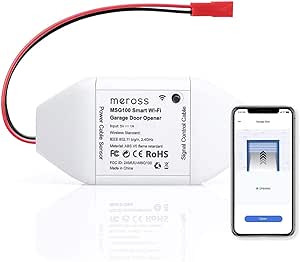 | Best for No-Subscription Status Monitoring | Model: MSG100 | Connectivity: Wi-Fi | Compatible assistants: Alexa, Google Assistant, and SmartThings | VIEW ON AMAZON | See Our Full Breakdown |
| Smart WiFi Garage Door Opener Remote Controller – Smartphone App Control, Alexa, Google Assistant & IFTTT Compatible, No Hub Required |  | Best for Multi-User Notifications | Brand: Aubric | Model number: 682559353143 | Connectivity: Wi-Fi | VIEW ON AMAZON | See Our Full Breakdown |
| Chamberlain Smart Garage Control – Wireless Garage Hub and Sensor with Wi‑Fi & Bluetooth, Smartphone Controlled (myQ‑G0401‑ES), White |  | Best for Straightforward myQ Setup | Mounting type: Ceiling mount | Output type: Push button | Sensing distance: 7 feet | VIEW ON AMAZON | See Our Full Breakdown |
| AGSHOME Smart Wi-Fi Garage Door Opener Controller |  | Best for Straightforward Family Alerts | Brand: AGSHOME | Model: GAR-01 | Connectivity: Wi-Fi, 2.4 GHz only | VIEW ON AMAZON | See Our Full Breakdown |
| LiftMaster myQ Smart Garage Control with Wi-Fi and Bluetooth, White |  | Best for Guest Access and Delivery Control | Brand: LiftMaster | Model: 821LMC-S | Connectivity: Wi-Fi and Bluetooth Low Energy | VIEW ON AMAZON | See Our Full Breakdown |
| Genie Aladdin Connect Smart Garage Door Controller – Single Door Kit (ALKT2‑R) |  | Best for a No-Subscription Family Setup | Manufacturer: The Genie Company | Model: ALKT2-R | Package quantity: 1 | VIEW ON AMAZON | See Our Full Breakdown |
| Alpha Smart Garage and Gate Opener with Geofencing |  | Best for Shared Family Access and Geofencing | Manufacturer: Selindus | Model: SG001G | Part number: UR-YOID-VC73 | VIEW ON AMAZON | See Our Full Breakdown |
| Konnected Smart Garage Door Opener blaQ – Works with Chamberlain/Liftmaster Security+ Openers – Local myQ Alternative |  | Best for Local Smart-Home Control | Manufacturer: Konnected | Model: KIT-GDOv2-Q | Power source: DC | VIEW ON AMAZON | See Our Full Breakdown |
| eKyro Smart Garage Door Opener – Universal WiFi Remote Controller (Alexa, Google Home, iPhone, Siri, Android) | 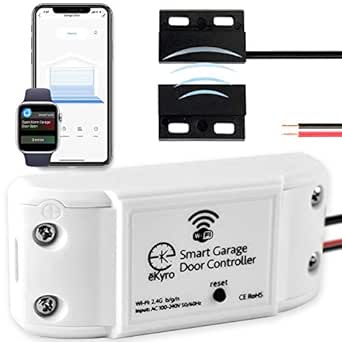 | Best for Multi-Door Voice Control | Model: EKGDA260 | Manufacturer: eKyro | Compatible platforms: Alexa, Google Assistant, Siri, iOS, Android | VIEW ON AMAZON | See Our Full Breakdown |
| Chamberlain myQ Smart Garage Hub, Wi-Fi Smartphone Controller, Model MYQ-G0301 |  | Best for Simple Household Access Sharing | Model: MYQ-G0301 | Connectivity: 2.4 GHz Wi-Fi, 802.11 b/g/n | Opener compatibility: Most garage door openers made after 1993 with standard safety sensors | VIEW ON AMAZON | See Our Full Breakdown |
| meross MSG150HK Smart Garage Door Opener Remote with Apple HomeKit |  | Best for Apple-First Families | Model: MSG150HK | Compatible opener brands: Most Chamberlain, Lift-Master, and Craftsman openers | Supported protocols: Security+ 1.0 and Security+ 2.0 | VIEW ON AMAZON | See Our Full Breakdown |
| meross Smart Wi-Fi Garage Door Opener Remote |  | Best for Broad Opener Compatibility | Model: MSG100 | Connectivity: 2.4 GHz Wi-Fi | Opener compatibility: 200 brands and over 1,600 models; adapter may be required | VIEW ON AMAZON | See Our Full Breakdown |
| ismartgate MINI Wi-Fi Smart Garage Door Opener |  | Best for Wireless Door-Position Alerts | Model: iSG-02WNA402 | Connectivity: Wi-Fi | Maximum doors supported: 1 | VIEW ON AMAZON | See Our Full Breakdown |
| smart garage controllers for family safety | Connectivity | Model | Dimensions |
|---|---|---|---|
| myQ Smart Garage Door Video Ke | Bluetooth and Wi-Fi | — | 2.71 x 1.36 x 6.3 inches |
| YoLink Smart Garage Door Kit w | Wireless sensor; hub requires Wi-Fi | — | — |
| meross Smart Garage Door Opene | Wi-Fi | MSG100 | — |
| Smart WiFi Garage Door Opener | Wi-Fi | — | 3.54 x 1.57 x 0.98 inches |
| Chamberlain Smart Garage Contr | — | — | 0.8 x 2.6 x 2.6 inches |
| AGSHOME Smart Wi-Fi Garage Doo | Wi-Fi, 2.4 GHz only | GAR-01 | — |
| LiftMaster myQ Smart Garage Co | Wi-Fi and Bluetooth Low Energy | 821LMC-S | — |
| Genie Aladdin Connect Smart Ga | — | ALKT2-R | 5.75 x 1.9 x 9.25 inches |
| Alpha Smart Garage and Gate Op | Wi-Fi | SG001G | 1.1 x 1.9 x 2.2 inches |
| Konnected Smart Garage Door Op | — | KIT-GDOv2-Q | 2.75 x 1.9 x 1.2 inches |
| eKyro Smart Garage Door Opener | Wi-Fi | EKGDA260 | — |
| Chamberlain myQ Smart Garage H | 2.4 GHz Wi-Fi, 802.11 b/g/n | MYQ-G0301 | 4.5 × 1.5 × 4.5 inches |
| meross MSG150HK Smart Garage D | 2.4 GHz Wi-Fi | MSG150HK | — |
| meross Smart Wi-Fi Garage Door | 2.4 GHz Wi-Fi | MSG100 | 3.7 × 1.8 × 0.9 inches |
| ismartgate MINI Wi-Fi Smart Ga | Wi-Fi | iSG-02WNA402 | — |
More Details on Our Top Picks
myQ Smart Garage Door Video Keypad with Wide-Angle Camera, Customizable PIN Codes, and Smartphone Control – Works with Chamberlain, LiftMaster, and Craftsman Openers (White)
I rank this myQ keypad highest for households where knowing who is at the garage matters as much as opening the door remotely. Its 1080p wide-angle camera, motion alerts, and two-way audio give families more visibility than the Chamberlain Smart Garage Control, which focuses on remote operation and door alerts rather than video communication. Time-limited PINs also let parents grant access to a sitter or contractor without sharing a permanent code. The tradeoff is that AI identification of people, cars, and packages requires a subscription, and the battery needs periodic attention. Its alerts are listed as motion-only, so buyers wanting richer detection without ongoing service should weigh that limitation. Choose it for access oversight, not just basic app control.
Pros:- Wide-angle 1080p camera adds visual context to garage activity.
- Time-limited PINs provide controlled access for guests and service providers.
- Two-way audio supports live communication at the keypad.
- Motion alerts notify users about activity.
Cons:- AI detection of people, cars, and packages requires a paid subscription.
- Battery power means periodic recharging or replacement.
- Listed alerts are motion-based, rather than detailed event identification without the subscription.
Best for: Families who regularly give temporary garage access to children, caregivers, or service providers and want video and two-way communication.
Not ideal for: Households seeking a low-maintenance, subscription-free controller focused only on checking and operating the door.
- Video resolution:1080p
- Connectivity:Bluetooth and Wi-Fi
- Power source:Battery powered
- Controls:Smartphone app
- Alerts:Motion
- Maximum range:900 feet
- Dimensions:2.71 x 1.36 x 6.3 inches
- Weight:1.3 pounds
Our verdict“Choose this myQ keypad if temporary access codes and video oversight matter more to your family than a simple, maintenance-light door controller.”
YoLink Smart Garage Door Kit with Hub – App-Controlled, Voice Assistant Compatible, 1/4‑Mile Range
The YoLink kit earns its place for families whose garage sits far from the house or router: its sensor communicates with the hub over a stated quarter-mile range, while the hub connects to the internet through Wi-Fi. Open-door alerts and app control cover the core safety task of checking whether the door was left open. Compared with the meross MSG100, YoLink emphasizes a separate hub-and-sensor system and long-range communication; meross instead offers a wired sensor and a broader set of status notifications without a hub. YoLink also supports Alexa, Google Assistant, IFTTT, and Home Assistant. The hub needs constant power, and initial Wi-Fi setup may take more effort for less technical households. It is a sensible fit when sensor distance is the deciding factor, not the simplest setup.
Pros:- Sensor communication range is listed at up to one quarter mile.
- Open-door alerts support routine checks on garage security.
- Works with Alexa, Google Assistant, IFTTT, and Home Assistant.
- Adds smart control to an existing opener rather than replacing it.
Cons:- Hub requires a constant power source.
- Wi-Fi setup may be challenging for less technical users.
- Separate hub adds another device to place and connect.
Best for: Families with a detached garage or a long distance between the door sensor and the home network who want app and voice access.
Not ideal for: Buyers who want a minimal setup, do not have a convenient powered location for a hub, or prefer a wired sensor system.
- Connectivity:Wireless sensor; hub requires Wi-Fi
- Sensor batteries:2 AAA batteries
- Compatible devices:Smartphone and tablet
- Included components:Hub, USB cable, power adapter, Ethernet cable, garage door sensor, garage door controller
- Sensor communication range:Up to 1/4 mile
- Voice and automation compatibility:Alexa, Google Assistant, IFTTT, and Home Assistant
Our verdict“Pick YoLink when your garage’s distance from the home network makes long-range sensor communication more valuable than a simpler, hub-free arrangement.”
meross Smart Garage Door Opener Remote
For families who mainly need reliable reminders and remote control, the meross MSG100 offers a useful safety-focused mix without a hub or subscription. Its wired sensor reports door status, while overtime and overnight notifications can catch a door left open after the household has settled in. Operation history adds a record of activity, unlike the YoLink kit’s more range-centered appeal. The MSG100 also works with Alexa, Google Assistant, and SmartThings. Its broad stated opener support helps, but some installations need an adapter, and it does not support Security+ 3.0. Compared with the Aubric Wi-Fi controller, meross provides explicit compatibility details and a two-year warranty in the supplied data, though its opener protocol limits still call for a compatibility check before buying.
Pros:- App and voice control work without a hub or subscription.
- Overtime and overnight alerts help flag a door left open.
- Wired sensor and operation history provide door-status context.
- Supports Alexa, Google Assistant, and SmartThings.
Cons:- Does not support Security+ 3.0 opener protocols.
- Some opener models may require a separate adapter.
- Compatibility depends on the opener model and protocol.
Best for: Families who want remote door checks, overnight reminders, and voice control without adding a hub or paying for a subscription.
Not ideal for: Owners of Security+ 3.0 openers or buyers unwilling to verify opener compatibility and possible adapter needs before installation.
- Model:MSG100
- Connectivity:Wi-Fi
- Compatible assistants:Alexa, Google Assistant, and SmartThings
- Supported opener protocols:Security+ 1.0 and Security+ 2.0; not Security+ 3.0
- Supported opener models:Over 1,600 across 200 brands; adapter may be required
- Power:110V-to-5V adapter; no battery required
- Weight:9.6 ounces
- Warranty:2 years
Our verdict“Choose the meross MSG100 if your opener is compatible and you want useful overnight and extended-open alerts without a hub or subscription.”
Smart WiFi Garage Door Opener Remote Controller – Smartphone App Control, Alexa, Google Assistant & IFTTT Compatible, No Hub Required
The Aubric controller is a good match for families who want multiple users notified about garage activity and value broad voice-assistant support. Its app, scheduling, and two-wire installation add remote operation without a separate hub, while compatibility includes Alexa, Google Assistant, Siri, and IFTTT. That makes it more automation-friendly on paper than the Chamberlain Smart Garage Control, whose supplied details focus on myQ alerts, scheduling, and Amazon Key. The tradeoff is the Aubric’s stated limit of one controller per opener, plus battery-power requirements. The product data also gives a 200-meter maximum range, so the Wi-Fi environment still matters. Unlike the myQ video keypad, it does not provide camera coverage or two-way audio; this is an app-and-notification choice, not a visual access system.
Pros:- Supports app control and notifications for multiple users.
- Works with Alexa, Google Assistant, Siri, and IFTTT.
- Two-wire installation adds smart control without a hub.
- Scheduling supports routine garage-door automation.
Cons:- Supports only one controller per garage door opener.
- Requires battery power, unlike the adapter-powered meross MSG100.
- Does not provide camera coverage or two-way audio.
Best for: Families who want several household members to receive garage notifications and plan to use voice assistants or IFTTT routines.
Not ideal for: Households seeking video verification, battery-free operation, or more than one controller on a single opener.
- Brand:Aubric
- Model number:682559353143
- Connectivity:Wi-Fi
- Compatible control platforms:Alexa, Google Assistant, HomeKit, and IFTTT
- Maximum supported devices:1 controller per opener
- Maximum range:200 meters
- Dimensions:3.54 x 1.57 x 0.98 inches
- Weight:340 g
Our verdict“Choose Aubric if shared alerts and broad voice-assistant compatibility matter more to your family than camera features or a multi-controller setup.”
Chamberlain Smart Garage Control – Wireless Garage Hub and Sensor with Wi‑Fi & Bluetooth, Smartphone Controlled (myQ‑G0401‑ES), White
The Chamberlain Smart Garage Control is the clearest pick for families who want a familiar myQ app for remote checks, alerts, and scheduling, without needing video or guest PIN management. Bluetooth-assisted setup may make installation more approachable than YoLink’s hub configuration, while Amazon Key integration gives participating households an in-garage delivery option. Against the meross MSG100, this model’s appeal is its Chamberlain ecosystem and delivery integration; meross offers more explicit overnight and overtime alert details in the supplied product data. Compatibility is the key caveat: it works with most openers made after 1993, but some older or specific models, including yellow learn-button units, are excluded. It also needs 2.4 GHz Wi-Fi and a nearby router, so check both your opener and garage network before choosing it.
Pros:- myQ app supports remote operation, alerts, and scheduling.
- Bluetooth-assisted setup can simplify installation.
- Works with most garage door openers made after 1993.
- Amazon Key integration supports in-garage deliveries.
Cons:- Requires a 2.4 GHz Wi-Fi network and router within about 50 feet of the hub.
- Not compatible with some older or specific opener models, including yellow learn-button units.
- US-only certification limits use outside the United States.
Best for: Families with a compatible opener, nearby 2.4 GHz Wi-Fi, and a preference for myQ alerts, scheduling, and Amazon Key delivery access.
Not ideal for: Owners of excluded opener models, garages beyond reliable router reach, or households needing camera monitoring and temporary PIN codes.
- Mounting type:Ceiling mount
- Output type:Push button
- Sensing distance:7 feet
- Dimensions:0.8 x 2.6 x 2.6 inches
- Weight:13.1 ounces
- Network requirement:2.4 GHz Wi-Fi
- Setup connectivity:Bluetooth
- App:myQ
Our verdict“Choose the Chamberlain Smart Garage Control if your opener and Wi-Fi meet its requirements and you want simple myQ monitoring with delivery integration.”
AGSHOME Smart Wi-Fi Garage Door Opener Controller
The AGSHOME is a practical fit for families who mainly want to check whether the garage door is open and receive opening and closing notifications. It adds remote control through Smart Life and supports Alexa, Google Assistant, and SmartThings, giving more household members familiar ways to check or operate the door. Compared with the LiftMaster myQ Smart Garage Control, it offers a simpler app-and-assistant approach but lacks myQ’s stated guest access, scheduling, and Amazon Key support. Installation is designed for a do-it-yourself setup, though compatibility needs checking before purchase: some openers with yellow or partial purple learn buttons are incompatible. Its 2.4 GHz-only Wi-Fi also rules it out for households whose garage network relies on 5 GHz. For one compatible door and clear status updates, the tradeoff is a relatively basic feature set.
Pros:- Sends opening and closing notifications that can help family members check door activity.
- Supports Alexa, Google Assistant, and SmartThings voice control.
- Offers remote control and monitoring through the Smart Life app.
- Includes step-by-step installation instructions and is designed for DIY setup.
Cons:- Supports only 2.4 GHz Wi-Fi.
- Incompatible with some opener models, including those with yellow or partial purple learn buttons.
- Supports a maximum of one device.
Best for: Families with one compatible garage door who want phone monitoring, voice control, and open-or-close alerts without a more elaborate setup.
Not ideal for: Households with an opener that has a yellow or partial purple learn button, or a garage Wi-Fi network that only supports 5 GHz.
- Brand:AGSHOME
- Model:GAR-01
- Connectivity:Wi-Fi, 2.4 GHz only
- Compatible assistants:Amazon Alexa, Google Assistant, SmartThings
- Maximum supported devices:1
- Maximum range:4 meters
- Power:No battery
- Color:White
Our verdict“Choose the AGSHOME for basic remote checks and family alerts on one compatible door, but verify the opener and Wi-Fi requirements first.”
LiftMaster myQ Smart Garage Control with Wi-Fi and Bluetooth, White
For families who need more than a simple open-or-close alert, the LiftMaster myQ adds guest access and scheduling alongside real-time notifications. Those controls can help coordinate household access and set routines, while Bluetooth Low Energy is intended to simplify setup. It also supports Amazon Key in-garage delivery, a specific advantage over the more basic AGSHOME controller, which focuses on app and voice control rather than delivery access. The tradeoff is that compatibility has defined limits: the opener must meet the listed photoelectric-sensor requirements and must not switch to low-power mode. Families with two garage doors also need to buy an additional sensor to monitor the second one. Compared with the Genie Aladdin Connect, myQ is the stronger fit when guest access and scheduling matter more than a single-door, no-monthly-fee setup.
Pros:- Provides real-time alerts and scheduling through the myQ app.
- Offers guest access for coordinating entry with other people.
- Bluetooth Low Energy simplifies setup.
- Supports Amazon Key in-garage delivery.
Cons:- Compatibility is limited to openers that meet the stated photoelectric-sensor requirements and do not switch to low-power mode.
- A separate sensor, sold separately, is required to monitor a second door.
- The listed features depend on use of the myQ app.
Best for: Families with a compatible opener who want to schedule access, share guest access, or use Amazon Key for in-garage delivery.
Not ideal for: Households with an opener that fails myQ’s sensor or low-power-mode requirements, or families seeking two-door monitoring without buying another sensor.
- Brand:LiftMaster
- Model:821LMC-S
- Connectivity:Wi-Fi and Bluetooth Low Energy
- Compatibility:Major opener brands manufactured after 1993 with photoelectric sensors that do not switch to low-power mode
- Second-door support:Requires an additional sensor, sold separately
- Amazon Key:Supported
- Material:Plastic
- Item weight:12.8 ounces
- Color:White
Our verdict“Pick myQ when guest access, scheduling, and Amazon Key matter more than avoiding a second-door sensor purchase.”
Genie Aladdin Connect Smart Garage Door Controller – Single Door Kit (ALKT2‑R)
The Genie Aladdin Connect is a strong choice for a family that wants phone-based status checks and smart-home links without adding a monthly subscription. Its real-time alerts can help household members keep track of a single door, while compatibility with Alexa, Google Assistant, Ring, and Amazon Key gives it a broader listed platform mix than the AGSHOME. Installation is designed to avoid professional wiring, which makes it a more approachable option for a straightforward single-door upgrade. The kit is explicitly for one garage door, however, and remote functions depend on a stable Wi-Fi connection. Its sensor also uses a battery that will need periodic replacement. Compared with the LiftMaster myQ, Genie’s clearest distinction is the stated absence of monthly fees; myQ, in turn, lists guest access and scheduling that Genie’s supplied details do not specify.
Pros:- Provides smartphone control, status monitoring, and real-time alerts.
- Works with Alexa, Google Assistant, Ring, and Amazon Key.
- Wireless installation requires no professional wiring.
- No monthly subscription fee is required.
Cons:- Remote functionality requires a stable Wi-Fi connection.
- The sensor battery will need periodic replacement.
- May not work with very old or proprietary opener models.
Best for: Families upgrading one compatible door who want app alerts and broad smart-home integration without a monthly subscription.
Not ideal for: Households with multiple doors to monitor, unreliable garage Wi-Fi, or an old or proprietary opener that may not be compatible.
- Manufacturer:The Genie Company
- Model:ALKT2-R
- Package quantity:1
- Included components:Door Control Module, Door Position Sensor, installation instructions
- Dimensions:5.75 x 1.9 x 9.25 inches
- Item weight:1.08 pounds
- Color:Black
- Battery cell type:Lithium Manganese Dioxide
- Subscription:No monthly fee
Our verdict“Choose Genie for a compatible single door when you want app alerts, smart-home links, and no monthly subscription.”
Alpha Smart Garage and Gate Opener with Geofencing
Alpha stands apart from single-door-focused controllers by supporting compatible garage doors and gates, with family device sharing and geofencing automation through the Tuya app. That combination can suit households where several people need access or where an arrival-based routine is useful. It also offers status alerts and voice control through Alexa, Google Home, and Google Assistant, without requiring a hub. Compared with the AGSHOME, which lists a single supported device and standard opening and closing notifications, Alpha’s appeal is its shared access and geofencing. The tradeoff is that compatibility depends on connecting to an existing opener control board; the product description does not establish universal compatibility. Families should confirm their opener or gate system supports the required connection before choosing it. Its listed Wi-Fi connectivity also makes a dependable network part of the setup.
Pros:- Supports family device sharing and geofencing automation.
- Works with compatible garage doors and gates.
- Provides door status alerts through the Tuya app.
- Supports Alexa, Google Home, and Google Assistant without a hub.
Cons:- Requires connection to a compatible opener control board.
- Compatibility depends on the existing garage door or gate system.
- Remote and automated functions rely on Wi-Fi connectivity.
Best for: Families sharing access to a compatible garage door or gate who want Tuya-based device sharing and geofencing routines without a hub.
Not ideal for: Buyers whose opener or gate lacks a compatible control board, or families who prefer a controller with clearly specified opener compatibility.
- Manufacturer:Selindus
- Model:SG001G
- Part number:UR-YOID-VC73
- Connectivity:Wi-Fi
- App:Tuya
- Voice assistants:Alexa, Google Home, Google Assistant
- Hub required:No
- Dimensions:1.1 x 1.9 x 2.2 inches
- Mounting type:Wall mount
Our verdict“Pick Alpha if your compatible opener supports its control-board connection and your family will use device sharing or geofencing.”
Konnected Smart Garage Door Opener blaQ – Works with Chamberlain/Liftmaster Security+ Openers – Local myQ Alternative
Konnected is the lineup’s clearest choice for families who want garage automation to keep working without depending on a cloud service. Its fully local control and integrations with Home Assistant, Hubitat, SmartThings, Alexa, and other platforms can support household routines while reducing reliance on a remote service. That makes it a different proposition from the app-centered AGSHOME and Genie Aladdin Connect, whose descriptions emphasize phone-based remote control. Konnected also needs no batteries or subscription and includes wiring and mounting hardware. The main boundary is opener compatibility: it is designed for Chamberlain or LiftMaster Security+ models but does not work with newer Security+ 3.0 openers identified as 2025 models. Buyers should also be comfortable connecting the included wiring and using a compatible smart-home platform; this is less suited to someone seeking a simple standalone app experience.
Pros:- Local control does not rely on a cloud service.
- Integrates with Home Assistant, Hubitat, SmartThings, Alexa, and other listed platforms.
- Requires no batteries and has no subscription fees.
- Includes hookup wire, mounting hardware, a mini screwdriver, and a power adapter.
Cons:- Not compatible with newer Security+ 3.0 openers identified as 2025 models.
- Requires a compatible Chamberlain or LiftMaster Security+ opener.
- Best suited to buyers comfortable with wiring and smart-home platform setup.
Best for: Smart-home households with a compatible Chamberlain or LiftMaster Security+ opener that want local automation through platforms such as Home Assistant or Hubitat.
Not ideal for: Owners of Security+ 3.0 openers or families who want a simple, standalone phone app rather than smart-home-platform integration.
- Manufacturer:Konnected
- Model:KIT-GDOv2-Q
- Power source:DC
- Voltage:12 volts
- Dimensions:2.75 x 1.9 x 1.2 inches
- Item weight:9.1 ounces
- Included components:Hookup wire, mini screwdriver, mounting kit, power adapter, wall decal
- Warranty:1 year against manufacturer defects
- Compatibility note:Not compatible with newer Security+ 3.0 openers identified as 2025 models
Our verdict“Choose Konnected for local smart-home control on a compatible Security+ opener, but skip it if you have Security+ 3.0 or want app-only simplicity.”
eKyro Smart Garage Door Opener – Universal WiFi Remote Controller (Alexa, Google Home, iPhone, Siri, Android)
Broad voice-assistant support makes the eKyro a flexible choice for households that want different family members to control the garage through their preferred platforms. It works with Alexa, Google Assistant, Siri, iOS, and Android, and does not charge a monthly subscription for its listed features. Unlike the meross MSG150HK, which is limited to one door and a defined set of opener brands, eKyro lets you pair multiple controllers for a multi-door setup and is described as compatible with most existing openers. That can simplify shared access across a larger household, but compatibility is not automatic: some openers need an adapter, and extra SMS or phone-call alerts may cost more. I’d choose it for platform flexibility and multiple doors, not for families seeking a clearly specified built-in safety sensor or free premium alerts.
Pros:- Supports Alexa, Google Assistant, Siri, iOS, and Android
- No monthly subscription fee for listed features
- Multiple controllers can be paired for multi-door setups
- Universal compatibility is described for most existing openers, with an adapter available for unsupported models
Cons:- Some opener brands may require a separately obtained adapter
- Extra SMS or phone-call alerts may incur additional costs
- Product details do not specify a door sensor or its alert behavior
Best for: Families with more than one garage door who use a mix of Alexa, Google Assistant, Siri, iPhone, and Android devices.
Not ideal for: Households that want SMS or phone-call alerts without extra charges, or buyers who need confirmed compatibility without checking for an adapter.
- Model:EKGDA260
- Manufacturer:eKyro
- Compatible platforms:Alexa, Google Assistant, Siri, iOS, Android
- Connectivity:Wi-Fi
- Multi-door support:Multiple controllers can be paired
- Item weight:12.8 ounces
- Package dimensions:6.02 × 4.53 × 2.05 inches
- Date first available:July 8, 2019
Our verdict“Choose eKyro if your family needs voice-assistant flexibility across multiple doors and is willing to check opener compatibility and alert costs.”
Chamberlain myQ Smart Garage Hub, Wi-Fi Smartphone Controller, Model MYQ-G0301
The myQ Smart Garage Hub suits families who want a straightforward way to check door status and share access without relying on voice controls. Its app offers notifications, schedules, and guest access for up to three people, giving households a way to coordinate arrivals while limiting who can use the app. Compared with the eKyro, it has a more clearly defined guest limit and opener requirements, but fewer stated voice-assistant options and no multi-door pairing details. The safety-related fit is conditional: it requires a sectional door, standard safety sensors, a compatible opener, and nearby 2.4 GHz Wi-Fi. The 50-foot Wi-Fi distance can also constrain placement. I’d favor it when those requirements match the garage; families with non-sectional doors or weak Wi-Fi near the opener should look at alternatives such as meross MSG100.
Pros:- Provides smartphone control and garage-door status notifications
- Supports schedules and guest access for up to three people
- Compatible with many openers made after 1993 when they meet the stated requirements
Cons:- Requires a sectional door and compatible opener with standard safety sensors
- Needs a 2.4 GHz Wi-Fi router within 50 feet
- Listed features do not include voice-assistant control
Best for: Families with a compatible sectional garage door who want app status notifications, schedules, and controlled guest access for up to three people.
Not ideal for: Households with non-sectional doors, openers without standard safety sensors, or a router more than 50 feet from the hub.
- Model:MYQ-G0301
- Connectivity:2.4 GHz Wi-Fi, 802.11 b/g/n
- Opener compatibility:Most garage door openers made after 1993 with standard safety sensors
- Maximum Wi-Fi distance:50 feet
- Guest access:Up to 3 people
- Dimensions:4.5 × 1.5 × 4.5 inches
- Weight:8 ounces
- Mounting type:Surface mount
Our verdict“Pick the myQ Smart Garage Hub if your sectional door meets its compatibility rules and your family values scheduled app access and limited guest sharing.”
meross MSG150HK Smart Garage Door Opener Remote with Apple HomeKit
For a household built around Apple devices, the MSG150HK stands out for HomeKit and Siri support, with additional control through Alexa, Google Assistant, SmartThings, and CarPlay. Its safety-oriented tools include activity history, alerts, schedules, and automatic closing, helping family members check what happened and set a routine for closing the door. Unlike the eKyro, it does not offer stated multi-controller support, and it only supports one door. Its opener compatibility is also narrower than the meross MSG100: the MSG150HK is specified for most Chamberlain, Lift-Master, and Craftsman openers using Security+ 1.0 or 2.0. In return, it needs no wired door sensor or extra adapter according to the product details, and has no subscription fees. I’d shortlist it for a compatible, single-door Apple smart home, but not for other opener brands or households needing several doors managed by one setup.
Pros:- Supports Apple HomeKit, Siri, and CarPlay alongside Alexa, Google Assistant, and SmartThings
- Includes activity history, alerts, schedules, and automatic closing
- No subscription fees or wired door sensor required
- Two-year warranty
Cons:- Supports one garage door only
- Compatibility is limited to specified opener brands using Security+ 1.0 or 2.0
- Requires a 2.4 GHz Wi-Fi network
Best for: Apple-centered households with one compatible Chamberlain, Lift-Master, or Craftsman garage door that want HomeKit, CarPlay, and automatic closing.
Not ideal for: Families with multiple garage doors or openers outside the specified brands and Security+ 1.0 or 2.0 protocols.
- Model:MSG150HK
- Compatible opener brands:Most Chamberlain, Lift-Master, and Craftsman openers
- Supported protocols:Security+ 1.0 and Security+ 2.0
- Connectivity:2.4 GHz Wi-Fi
- Compatible platforms:Apple HomeKit, Alexa, Google Assistant, SmartThings, CarPlay
- Maximum supported devices:1
- Maximum range:200 meters
- Warranty:2 years
Our verdict“Choose the MSG150HK for a single compatible door in an Apple-first home where activity records and automatic closing matter more than multi-door support.”
meross Smart Wi-Fi Garage Door Opener Remote
The MSG100 earns its place for families who need to connect an existing opener across a wide range of brands and models: the product lists 200 brands and more than 1,600 models. App access, voice control through Alexa, Google Assistant, or SmartThings, plus door-status alerts and scheduled or automatic closing give households practical ways to check and manage a single door. Compared with the more Apple-focused meross MSG150HK, the MSG100 has broader stated opener coverage but does not list HomeKit, CarPlay, or activity history. It also includes a wired door sensor, which can help report door position, but installation means routing and mounting that sensor. A 2.4 GHz Wi-Fi connection and AC power are required, and some openers need an adapter. It is not compatible with Security+ 3.0, so checking the opener model matters more here than the broad headline compatibility suggests.
Pros:- Lists compatibility with 200 brands and more than 1,600 opener models
- Offers app and voice control without a hub or subscription
- Provides status alerts and scheduled or automatic closing
- Includes a wired door sensor
Cons:- Does not support Security+ 3.0
- Some openers may need an adapter
- Requires 2.4 GHz Wi-Fi, AC power, and wired sensor installation
Best for: Families with one existing opener who want broad model coverage, door-status alerts, and scheduled or automatic closing through Alexa, Google Assistant, or SmartThings.
Not ideal for: Apple HomeKit households, buyers with Security+ 3.0 openers, or anyone who cannot provide AC power and 2.4 GHz Wi-Fi near the controller.
- Model:MSG100
- Connectivity:2.4 GHz Wi-Fi
- Opener compatibility:200 brands and over 1,600 models; adapter may be required
- Supported protocols:Security+ 1.0 and Security+ 2.0; not Security+ 3.0
- Compatible assistants:Alexa, Google Assistant, SmartThings
- Maximum supported devices:1
- Power:AC; no battery required
- Dimensions:3.7 × 1.8 × 0.9 inches
Our verdict“Pick the MSG100 when broad opener coverage and practical closing alerts outweigh the need for HomeKit or support for Security+ 3.0.”
ismartgate MINI Wi-Fi Smart Garage Door Opener
The ismartgate MINI is a strong fit for families whose main concern is knowing whether a single door is open, closed, or left open. Its included wireless tilt sensor reports those states through the app, and the controller also works with Alexa and Google Home without subscription fees. That sensor setup makes its family-safety focus more explicit than the myQ Smart Garage Hub, whose listing emphasizes status notifications, schedules, and guest access rather than a wireless tilt sensor. The tradeoff is a more hands-on installation: the controller must be wired to the opener, and some models need a separately sold adapter. It supports one door only, so the eKyro is a better match for families managing several doors. I’d choose this MINI for a single-door household that wants a dedicated wireless sensor and accepts some setup work.
Pros:- Wireless tilt sensor reports open, closed, and left-open door states
- Provides remote monitoring and control through the mobile app
- Works with Alexa and Google Home without subscription fees
- Includes the controller, sensor, power supply, connection cable, and mounting tape
Cons:- Controls one garage door only
- Controller wiring and sensor installation are required
- Some opener models need a separately sold adapter
Best for: Households with one garage door that want app alerts for open, closed, and left-open states plus Alexa or Google Home control.
Not ideal for: Families managing multiple doors or buyers who want installation without wiring the controller to the opener or fitting a separate sensor.
- Model:iSG-02WNA402
- Connectivity:Wi-Fi
- Maximum doors supported:1
- Compatible platforms:Amazon Alexa, Google Home, IFTTT, iPhone, Android
- Included sensor:Wireless tilt sensor
- Power supply:5V, 1A
- Battery type:Type N
- Included components:Wi-Fi controller, wireless tilt sensor, power supply, connection cable, double-sided tapes
Our verdict“Choose the ismartgate MINI for one door if clear open-state alerts matter more than multi-door capacity or a simpler installation.”

How We Picked
I ranked these controllers around the safety decisions families actually face: confirming door status, controlling who can open it, receiving useful activity alerts, and getting dependable communication between the opener, sensor, and app. I also weighed compatibility clarity, setup demands, smart-home support, and whether the product offers a distinct family-safety advantage such as a camera, access codes, long-range connectivity, or local integrations. A feature only counts as useful when the household can reliably install and operate it.
The order gives priority to a clear safety benefit paired with practical everyday use. The myQ Video Keypad leads because it combines remote control with visual monitoring and PIN access; YoLink ranks strongly for range, while Konnected blaQ serves a narrower, technically capable audience. Simpler hubs and universal remotes can be sensible picks, but their placement depends on fit and function rather than a longer feature list. Product compatibility and included accessories can vary by opener and package, so I treat those as points buyers should verify before choosing.
Factors to Consider When Choosing Smart Garage Controllers For Family Safety
Choosing a garage controller for a family is less about collecting app features and more about deciding which risks and routines it should address. I would start with the door and opener already installed, then match the controller to how family members enter, how the household receives alerts, and what happens if the internet or power connection is interrupted.
Check Opener Compatibility Before Comparing Apps
Make the opener’s brand, model, approximate age, and wall-control wiring your first checklist. Controllers described as universal may still require a compatible connection method or an added adapter, and some branded systems work best within their own opener families. A wrong match can turn a promising safety feature into a return or an installation project. Photograph the opener label and wall control, then compare those details with the manufacturer’s compatibility list before purchase. Also check whether the package supports one door or several, since a second door may need another sensor or controller. This step matters more than voice-assistant support: a controller that cannot reliably read your door is not useful for family oversight.
Choose Access Controls That Match Your Household
Families often need different levels of access for children, relatives, cleaners, or other visitors. A keypad with individual or changeable codes can be easier to manage than sharing a single app login, while app-based access may suit adults who already use the same smart-home platform. Before choosing, ask how quickly a code can be changed and whether the system records or reports access events. Avoid sharing a master account simply because it is convenient; it can make access harder to revoke when household arrangements change. A camera can add context to entry, but it also brings placement, privacy, and account-security questions. Pick the access method your household will actually manage consistently.
Treat Alerts as Support, Not Proof of Security
Door-open alerts are most useful when they arrive promptly and clearly identify which door changed state. Some households need a reminder if the garage is left open at bedtime; others care more about unexpected opening events during the day. Check whether alerts depend on a cloud service, what event types can be selected, and whether multiple family members can receive them. A notification cannot stop someone from entering, and a camera view may not cover every approach to the garage. Keep the opener’s safety sensors and auto-reverse function working, and do not rely on a phone alert as a replacement for those protections. The right controller adds awareness to a sound physical setup.
Plan for Wi-Fi Gaps, Outages, and Detached Garages
A controller’s communication path can shape whether it works reliably where the garage is located. A detached garage or weak signal may call for a hub-and-sensor system with extended range, such as the kind represented by YoLink, rather than a Wi-Fi-only device at the door. Check whether the hub needs a wired network connection, a separate outlet, or a position inside the house. Ask what local controls remain available during an internet outage and whether door-status updates pause when the service is offline. Do not assume a stated wireless range guarantees performance through walls, metal doors, or other obstructions. Testing the signal near the opener before installation can prevent a safety device from becoming an unreliable one.
Decide How Much Smart-Home Control You Need
Voice assistants and automation can make daily routines easier, but adding more connections can also create more accounts, permissions, and failure points. A household that wants a simple open-or-close app may be better served by a straightforward controller than by a system built for several automation platforms. Advanced local integrations, such as those offered by Konnected blaQ, can appeal to technically confident owners who want more control over their setup. Before buying, check whether the features you need are supported directly or rely on third-party services that could change. Avoid building an automation that closes the door without a reliable way to confirm the area is clear. Convenience should not remove a family’s chance to notice an unsafe situation.
Compare Installation and Ongoing Household Upkeep
Installation can involve mounting a sensor, connecting wires, pairing a hub, and setting up accounts for each household member. A beginner-friendly kit may be a better fit than a flexible DIY controller if no one at home wants to troubleshoot network settings or integrations. Check whether the package includes the required sensor and mounting hardware, and whether each additional door needs another kit. Set a simple maintenance routine: test status reporting, review access permissions, and replace sensor batteries when needed. Keep account recovery details available to more than one trusted adult, so one lost phone does not lock the household out of its controls. The easiest product to maintain is often safer in practice than a more capable device that nobody keeps configured.
Frequently Asked Questions
Will a smart garage controller work with my existing opener?
It depends on the opener’s brand, model, control wiring, and security protocol, not just whether the product is labeled universal. Check the controller maker’s compatibility information against the opener label and wall-control setup before ordering. Some systems are designed for a specific ecosystem, while others need an adapter or extra wiring for certain models. If the opener is older or the information is unclear, contact the controller maker with the model number and a photo of the wiring. Do not assume that matching the brand name alone confirms compatibility.
Can my children use a keypad without having access to my smart-home account?
A keypad with PIN access can let family members enter without sharing an adult’s app login, which can make access easier to manage. Check whether codes can be changed or removed separately and whether the system reports keypad activity. Teach children not to share the code and choose one they can remember without using an obvious family detail. App access can still be useful for adults who need remote status checks or temporary access for a trusted visitor. A keypad manages entry convenience; it does not replace supervision or a secure garage door.
What should I choose if the garage has weak Wi-Fi?
First check the signal at the opener, not just inside the house, and consider whether a hub can sit somewhere with a better connection. A hub-and-sensor setup such as YoLink’s may suit a longer distance between the home network and the garage, but the actual result depends on walls and obstructions. A Wi-Fi-only controller may work if you can improve coverage with a properly placed access point. Ask which functions still operate if the internet connection drops and whether the app can show delayed status. Reliable door-state updates matter more than a long advertised range by itself.
Does a garage controller make the door safe for children?
No controller can replace the opener’s working safety sensors, auto-reverse mechanism, and safe household habits. Smart alerts can help adults notice that a door is open or has changed state, while a camera or access code may add useful oversight. They cannot guarantee that a child is clear of the door or prevent every unsafe interaction. Test the opener’s safety features according to its manual and keep children away from moving doors and pinch points. Treat remote control as an added convenience that requires careful use, not as a child-safety device on its own.
Is a camera or local smart-home integration the better safety upgrade?
Choose based on the problem you are trying to solve. A camera and PIN keypad, as on the myQ Video Keypad, can help a household connect an entry event with visual context and manage access without distributing an app login. Local integrations such as Konnected blaQ are better suited to people who want their garage included in a broader automation setup and are comfortable maintaining it. A camera introduces privacy and account-protection needs, while advanced integrations can take more setup and troubleshooting. Neither option removes the need to confirm opener compatibility and maintain the door’s physical safety systems.
Conclusion
For most households, I would start with the myQ Smart Garage Door Video Keypad as the best overall choice because camera monitoring and PIN entry address both awareness and family access. The YoLink Smart Garage Door Kit is my best pick for a detached garage or a home with challenging Wi-Fi reach, while the Konnected blaQ is the best fit for experienced smart-home owners who want broader local integrations. For beginners who want a familiar, guided setup, I would compare the Chamberlain Smart Garage Control and LiftMaster myQ Smart Garage Control against the opener already installed. For a simpler value-focused setup, consider a basic controller such as the Chamberlain myQ Smart Garage Hub or a compatible meross option, after checking the exact model and required features. Before choosing any of them, confirm opener compatibility and decide whether your family needs access codes, visual oversight, extended range, or straightforward door-status alerts most.