For many households, the eufy Security Video Doorbell E340 is the best overall choice in this roundup, pairing dual-camera coverage with local storage. The SwitchBot Video Doorbell Camera stands out for its included monitor, while the Arlo Video Doorbell 2K offers a strong fit for households already using Arlo. The main tradeoff is between a simple indoor screen that a senior can answer without a phone and app-based systems with broader smart-home features. Subscription needs, installation, and who will manage alerts also affect the right pick. Read on for the full comparison, buying advice, and recommendations by household need.

Turn the school run and nap time into listening time
- Thousands of audiobooks, podcasts and originals
- Listen on your phone, tablet or Echo — also offline
- Cancel anytime
Complete the kit


Key Takeaways
- Included monitors are the clearest differentiator for phone-free use. SwitchBot, Winnes, FunnyPanda, and the touchscreen intercom model offer an indoor screen, while most other options depend more heavily on a smartphone app.
- Dual-camera models can show more than a face at the doorway. The eufy E340 and Philips dual-camera model are standouts for buyers who want a view that includes the area closer to the doorstep.
- Local storage changes the ongoing ownership equation. The eufy E340, touchscreen intercom model, and several products advertised without a subscription suit buyers who want to avoid a required ongoing plan, though storage details and app features still need checking.
- Video resolution alone does not determine usability. A clear image matters, but screen size, viewing angle, night visibility, alert handling, and easy two-way conversation can matter more to an older resident.
- Product names can hide meaningful bundle differences. The Arlo listing with Chime 2 adds an audible indoor alert, and Ring models appear in multiple variants; buyers should verify the exact included accessories and power configuration.
| Wyze Wireless Video Doorbell Pro with Chime |  | Best for a Clear, Simple Setup | Video resolution: 1440p | View: 1:1 head-to-toe | Night vision: Yes | VIEW ON AMAZON | See Our Full Breakdown |
| Wireless Doorbell Camera with 7″ Touchscreen Monitor, 1080P Video Intercom System, Dual-Band WiFi, PIR Motion Detection, Local Storage, 2‑Way Audio, Night Vision, App Control |  | Best for a Large Indoor Screen | Monitor screen: 7 inches | Video resolution: 1080p HD | Wi-Fi: 2.4 GHz and 5 GHz | VIEW ON AMAZON | See Our Full Breakdown |
| Arlo Video Doorbell 2K (2nd Gen) Wireless or Wired – 1 Camera |  | Best for Smart Alerts | Resolution: 2K | Field of view: 180 degrees | Weather resistance: IP65 | VIEW ON AMAZON | See Our Full Breakdown |
| Philips Security Video Doorbell Camera with Chime, Dual Cameras, 2K QHD |  | Best for Local Storage and Doorway Coverage | Resolution: 2K QHD | Camera count: Dual cameras | Night vision: Infrared | VIEW ON AMAZON | See Our Full Breakdown |
| SwitchBot Video Doorbell Camera Wireless with Monitor, No Subscription, 4.3‑Inch Screen, Battery Powered, Head‑to‑Toe View, 2K FHD, 2‑Way Audio, Motion Detection, Works with Alexa, Google, Home Assistant |  | Best Compact Monitor Without a Subscription | Monitor: 4.3-inch color screen; corded 5 V power | Resolution: 2K Full HD (3840 × 2160) | Field of view: 165 degrees | VIEW ON AMAZON | See Our Full Breakdown |
| VanaOrbi 1080p Wireless Video Doorbell Camera |  | Best for Simple, Subscription-Optional Monitoring | Resolution: 1080p | Connectivity: 2.4 GHz Wi-Fi | Power: Rechargeable battery | VIEW ON AMAZON | See Our Full Breakdown |
| Arlo Video Doorbell 2K (2nd Gen), Wireless or Wired, with Arlo Chime 2 |  | Best for Flexible Installation and an Audible Indoor Chime | Resolution: 2K | Field of view: 180 degrees | Weather resistance: IP65 | VIEW ON AMAZON | See Our Full Breakdown |
| Ring Battery Doorbell 2K – Retinal 2K Video, Wide‑Angle, 6x Enhanced Zoom, Two‑Way Talk, Built‑In Battery (Matte Mocha) |  | Best for Zooming in on Visitor Details | Video resolution: Retinal 2K with up to 6× enhanced zoom | Motion detection field of view: 140° horizontal, 140° vertical | Audio: Two-way talk | VIEW ON AMAZON | See Our Full Breakdown |
| Wyze Battery Video Doorbell Wireless Camera – 1536×1536 HD+ with Color Night Vision, 2‑Way Audio, 1:1 Head‑to‑Toe View, Wire‑Free/Wired |  | Best for Head-to-Toe Coverage and Local Storage | Resolution: 1536 x 1536 HD+ | Field of view: 150° x 150° | Battery life: Up to six months in wireless mode | VIEW ON AMAZON | See Our Full Breakdown |
| Ring Battery Doorbell 2K (2nd Gen), Speckled Gray | | Best for a Straightforward Ring-Compatible Setup | Video resolution: Retinal 2K | Enhanced zoom: Up to 6× | Field of view: 140° horizontal, 140° vertical | VIEW ON AMAZON | See Our Full Breakdown |
| Winnes Wireless Doorbell Camera with 1080P Monitor, No Monthly Fee |  | Best for No-Wi-Fi Households | Resolution: 1080P HD | Monitor screen: 4.3-inch IPS | Viewing angle: 170° | VIEW ON AMAZON | See Our Full Breakdown |
| FunnyPanda Wireless Video Doorbell Camera with 4.5-Inch Monitor |  | Best for a Larger Dedicated Screen | Video resolution: 720p | Monitor screen: 4.5-inch IPS LCD | Viewing angle: 120° | VIEW ON AMAZON | See Our Full Breakdown |
| eufy Security Video Doorbell E340, Dual Cameras, 2K FHD, 8GB Local Storage |  | Best for Dual-Angle Porch Coverage | Camera configuration: Dual cameras | Camera resolution: 2K FHD | Local storage: 8GB eMMC | VIEW ON AMAZON | See Our Full Breakdown |
| BOIFUN Wireless Video Doorbell Camera, No Subscription Required, 2K HD | 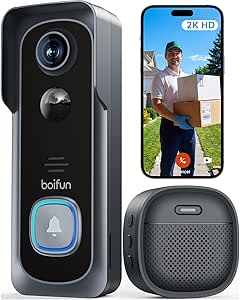 | Best for App Alerts Without a Required Subscription | Resolution: 2K HD (3 MP) | Field of view: 166° | Wi-Fi band: 2.4GHz only | VIEW ON AMAZON | See Our Full Breakdown |
| Orbitell 1080p Wireless Video Doorbell Camera |  | Best for Person-Filtered Motion Alerts | Model: M52 | Resolution: 1080p | Connectivity: 2.4GHz Wi-Fi | VIEW ON AMAZON | See Our Full Breakdown |
| video doorbell cameras for elderly safety | Resolution |
|---|---|
| Wyze Wireless Video Doorbell P | — |
| Wireless Doorbell Camera with | — |
| Arlo Video Doorbell 2K | 2K |
| Philips Security Video Doorbel | 2K QHD |
| SwitchBot Video Doorbell Camer | 2K Full HD (3840 × 2160) |
| VanaOrbi 1080p Wireless Video | 1080p |
| Arlo Video Doorbell 2K | 2K |
| Ring Battery Doorbell 2K | — |
| Wyze Battery Video Doorbell Wi | 1536 x 1536 HD+ |
| Ring Battery Doorbell 2K | — |
| Winnes Wireless Doorbell Camer | 1080P HD |
| FunnyPanda Wireless Video Door | — |
| eufy Security Video Doorbell E | — |
| BOIFUN Wireless Video Doorbell | 2K HD (3 MP) |
| Orbitell 1080p Wireless Video | 1080p |
More Details on Our Top Picks
Wyze Wireless Video Doorbell Pro with Chime
1440p video, a head-to-toe view, and a customizable indoor chime make this Wyze a practical choice for an older adult who benefits from seeing and hearing a visitor without rushing to the door. Its wire-free setup can suit homes where adding doorbell wiring is inconvenient, while two-way audio lets the resident respond from inside. Compared with the SwitchBot Video Doorbell Camera, Wyze includes a wireless chime rather than a dedicated screen, so it is less suited to someone who needs a visual indoor display. The chime’s 20 tones and eight volume levels offer useful flexibility for hearing preferences. Local microSD storage is available, but advanced features such as human detection may require a subscription, and battery life varies with use.
Pros:- 1440p video and a 1:1 head-to-toe view help show visitors and items near the threshold.
- Wireless chime offers 20 tones and eight volume levels.
- Wire-free installation can avoid the need for existing doorbell wiring.
- Optional microSD storage provides a local footage option.
Cons:- Advanced features such as human detection require an optional subscription.
- Battery life varies with activity and settings, so charging needs may be unpredictable.
- Unlike the SwitchBot and touchscreen-monitor systems, it does not include a dedicated indoor display.
Best for: Older adults who want a straightforward wireless installation, a loudness-adjustable chime, and a clear view of visitors without relying on an indoor monitor.
Not ideal for: People who need a dedicated screen for checking the door or continuous power without battery charging.
- Video resolution:1440p
- View:1:1 head-to-toe
- Night vision:Yes
- Audio:Two-way
- Installation:Wire-free or hardwired
- Chime:Wireless; 20 tunes and 8 volume levels
- Storage:Cloud with Cam Plus or microSD card
- Compatibility:Alexa, Google Assistant, and IFTTT
- Power:Battery powered
Our verdict“Choose Wyze if an adjustable chime and easy installation matter more than having a dedicated indoor screen.”
Wireless Doorbell Camera with 7″ Touchscreen Monitor, 1080P Video Intercom System, Dual-Band WiFi, PIR Motion Detection, Local Storage, 2‑Way Audio, Night Vision, App Control
The 7-inch touchscreen is this system’s main advantage: it gives residents a larger dedicated display for seeing who is outside, rather than requiring them to find and operate a phone. The included 32 GB TF card supports local recording, and adjustable PIR sensitivity can help tailor motion alerts. Compared with the SwitchBot Video Doorbell Camera, this model offers a larger screen and dual-band Wi-Fi, but its indoor monitor is rated for only six to eight hours of continuous use and needs to stay plugged in for ongoing operation. The doorbell itself can run on battery or 12–24 V hardwiring. That flexibility may help in different homes, though battery life varies and metal doors or nearby metal objects can disrupt its signal.
Pros:- Large 7-inch touchscreen makes visitor viewing less dependent on a smartphone.
- Includes a 32 GB TF card for local storage.
- Dual-band 2.4 GHz and 5 GHz Wi-Fi offers more network flexibility than the 2.4 GHz-only SwitchBot.
- Doorbell supports battery power or 12–24 V hardwiring.
Cons:- The indoor monitor lasts only six to eight hours of continuous use and needs power for continuous operation.
- Doorbell battery life varies with use and may require recharging.
- Metal doors or nearby metal objects can interfere with the signal.
Best for: Older adults who prefer a large, dedicated touchscreen for answering the door and have a convenient outlet near the monitor’s intended location.
Not ideal for: People who need a portable indoor monitor for all-day use away from an outlet, or whose doorbell location has significant metal-related signal interference.
- Monitor screen:7 inches
- Video resolution:1080p HD
- Wi-Fi:2.4 GHz and 5 GHz
- Local storage:32 GB TF card included
- Motion detection:Adjustable PIR; 160° wide-angle lens
- Night vision:Infrared
- Doorbell battery:7,000 mAh rechargeable
- Power options:Battery or 12–24 V hardwire
- App and audio:Tuya Smart app for Android/iOS; two-way audio
Our verdict“Pick this system when a large indoor touchscreen is the priority and you can keep its monitor plugged in.”
Arlo Video Doorbell 2K (2nd Gen) Wireless or Wired – 1 Camera
Arlo’s 180-degree view and smart detection are useful for households that want alerts to distinguish people, vehicles, packages, and animals rather than treating every movement alike. For an older adult, that can make phone notifications more relevant and help a caregiver check activity remotely. Its 2K video, night vision, and two-way audio cover the central safety needs, while battery or wired power gives more installation choice than the battery-only Wyze model. The tradeoff is the service dependency: the included Arlo Secure trial is temporary, and full smart detection and extended video history require a subscription. The 2.4 GHz Wi-Fi requirement may also limit placement in homes with weak coverage at the entrance. Compared with Philips, Arlo offers cloud-based features but not the same emphasis on local-only storage.
Pros:- 180-degree field of view captures a broad area around the entrance.
- Smart detection identifies people, vehicles, packages, and animals.
- Battery or wired power supports different installation situations.
- Two-way audio, night vision, and a siren add communication and response options.
Cons:- Full smart detection and extended video history require a subscription after the included trial.
- Uses 2.4 GHz Wi-Fi only.
- Battery life varies with use and settings.
Best for: Older adults with a caregiver or family member who wants person- and package-focused alerts and is comfortable managing a subscription for advanced features.
Not ideal for: Buyers who want ongoing smart detection and video history without a subscription, or who need a doorbell that uses Wi-Fi bands beyond 2.4 GHz.
- Resolution:2K
- Field of view:180 degrees
- Weather resistance:IP65
- Power:Rechargeable battery or wired trickle charging
- Connectivity:2.4 GHz Wi-Fi
- Smart detection:People, vehicles, packages, and animals
- Night vision:Yes
- Audio and siren:Two-way audio; siren included
- Video storage:60-day cloud history during trial
Our verdict“Choose Arlo if relevant remote alerts matter more than avoiding ongoing fees for advanced detection and video history.”
Philips Security Video Doorbell Camera with Chime, Dual Cameras, 2K QHD
Dual cameras and encrypted local storage give the Philips a distinct role for households that want a broader view without relying on cloud recording fees. Its 2K QHD video and infrared night vision support checking the entrance after dark, while battery or wired power lets buyers adapt installation to the home. Compared with the Arlo Video Doorbell 2K, Philips avoids a subscription-dependent cloud history by keeping recordings locally, but it does not offer Arlo’s listed smart detection for people, packages, vehicles, and animals. There is also a practical limitation: live streaming is available only from the front camera, so the second camera does not provide a second live view. Voice assistant use depends on compatible smart-home devices, and there is no cloud storage option if local footage is inaccessible.
Pros:- Dual cameras provide broader coverage than the single-camera Wyze and Arlo models listed here.
- 8 GB encrypted local storage avoids a required monthly cloud-storage plan.
- Battery or wired power supports more than one installation approach.
- 2K QHD video and infrared night vision aid visitor checks in low light.
Cons:- Live streaming is available only from the front camera.
- Storage is local only, with no cloud option.
- Voice assistant integration requires compatible smart-home devices.
Best for: Households seeking dual-camera doorway coverage and local encrypted recording without recurring cloud-storage fees.
Not ideal for: People who want cloud backup, live viewing from both cameras, or advanced person-and-package alerts like those listed for Arlo.
- Resolution:2K QHD
- Camera count:Dual cameras
- Night vision:Infrared
- Battery capacity:10,000 mAh
- Power options:Battery or 8–24 V wired power (>10 VA)
- Storage:8 GB encrypted local storage
- Weather resistance:All-weather
- Wattage:5 watts
Our verdict“Choose Philips if local recording and dual-camera coverage matter more than cloud backup or live access to both cameras.”
SwitchBot Video Doorbell Camera Wireless with Monitor, No Subscription, 4.3‑Inch Screen, Battery Powered, Head‑to‑Toe View, 2K FHD, 2‑Way Audio, Motion Detection, Works with Alexa, Google, Home Assistant
A dedicated 4.3-inch color monitor and included local storage make SwitchBot a straightforward option for residents who would rather check the doorway on a screen than open a phone app. Its 165-degree head-to-toe view, two-way audio, and claimed color night vision help with seeing and speaking to visitors, while the included 4 GB SD card avoids a required subscription. Compared with the larger-screen system in this lineup, SwitchBot takes up less display space but gives up screen size; its monitor must also stay plugged into a 5 V power source. The doorbell connects over 2.4 GHz Wi-Fi only, which could matter in homes with crowded or weak coverage. It supports Alexa, Google, and Home Assistant, though the monitor’s cord limits where it can be placed.
Pros:- Dedicated 4.3-inch color monitor allows quick visitor checks without using a phone.
- Includes a 4 GB SD card and supports expansion up to 512 GB.
- 165-degree view is designed to show the doorway from head to toe.
- Works with Alexa, Google, and Home Assistant.
Cons:- The monitor requires a corded 5 V power supply, limiting placement.
- Doorbell connects to 2.4 GHz Wi-Fi only.
- The 4.3-inch screen is smaller than the 7-inch monitor offered by the other monitor-based option.
Best for: Older adults who want a compact always-available indoor screen, local recording, and no required subscription, with an outlet nearby.
Not ideal for: People who need a large display, a cordless indoor monitor, or a doorbell that connects to 5 GHz Wi-Fi.
- Monitor:4.3-inch color screen; corded 5 V power
- Resolution:2K Full HD (3840 × 2160)
- Field of view:165 degrees
- Night vision:Infrared color night vision
- Battery capacity:5,000 mAh
- Connectivity:2.4 GHz Wi-Fi
- Included storage:4 GB SD card
- Expandable storage:MicroSD up to 512 GB
- Mounting:Wall mount, screw-in
Our verdict“Pick SwitchBot if a compact indoor display and subscription-free local storage matter more than a large screen or wireless monitor placement.”
VanaOrbi 1080p Wireless Video Doorbell Camera
For an older adult or caregiver who mainly needs to see who is at the door and answer remotely, the VanaOrbi keeps the setup focused: 1080p video, two-way audio, and real-time alerts cover those everyday tasks. Its AI human detection can cut down alerts from incidental movement, which may make notifications easier to follow. Compared with the Wyze Battery Video Doorbell, it gives up the wider head-to-toe view and color night vision, but its core features remain available without a cloud subscription. That distinction matters if ongoing recording is not a priority. The tradeoff is that cloud recording requires a subscription, and the 2.4 GHz-only Wi-Fi support may not suit every home network. Its 15-foot night vision range also gives less room for viewing a larger approach area.
Pros:- AI human detection can reduce alerts caused by non-human motion.
- Two-way audio and real-time notifications support remote conversations with visitors.
- Core functions remain available without a cloud subscription.
- Four-LED night vision supports viewing in low light.
Cons:- Cloud recording features require a subscription.
- Works only with 2.4 GHz Wi-Fi.
- Night vision is specified for a range of 15 feet.
Best for: Older adults and caregivers who want basic remote answering and human-focused alerts without subscribing for core doorbell functions.
Not ideal for: Households that need a broad view of visitors or packages, longer-range night vision, or connectivity to a 5 GHz-only network.
- Resolution:1080p
- Connectivity:2.4 GHz Wi-Fi
- Power:Rechargeable battery
- Night vision range:15 feet
- Audio:Two-way
- Storage:Encrypted cloud storage; recording features require a subscription
- Dimensions:1.8 x 1.28 x 5.5 inches
Our verdict“Choose the VanaOrbi for straightforward remote answering and human detection when subscription-free core use matters more than a wide view or advanced recording.”
Arlo Video Doorbell 2K (2nd Gen), Wireless or Wired, with Arlo Chime 2
The Arlo suits homes where the person inside needs a clear alert as well as the visitor view. Its included Arlo Chime 2 has adjustable melodies and volume, and its siren is specified at over 80 dB; that can be useful when a phone notification alone may be missed. The 180-degree field of view and 2K video also provide more context around a visitor than the VanaOrbi’s 1080p image. Battery or wired power gives caregivers flexibility to use an existing doorbell setup or avoid wiring work. The main compromise is recording access: after the trial, 60-day video history and advanced detection require a paid Arlo Secure plan. Buyers who want local recording without a subscription may prefer the Wyze Battery Video Doorbell’s microSD option, though its card is sold separately.
Pros:- Included Arlo Chime 2 provides adjustable melodies and volume.
- 180-degree field of view offers broad visitor coverage.
- 2K video provides more detail than the VanaOrbi’s 1080p resolution.
- Battery or wired power gives installation flexibility.
Cons:- A paid Arlo Secure plan is required after the trial for 60-day video history and advanced detection.
- Uses 2.4 GHz Wi-Fi only.
- The doorbell and chime add equipment to install and configure.
Best for: Older adults who may miss phone alerts and households that want an included adjustable indoor chime plus battery-or-wired installation.
Not ideal for: Buyers who want ongoing video history or advanced detection without a paid plan, or who need a local-storage-first setup.
- Resolution:2K
- Field of view:180 degrees
- Weather resistance:IP65
- Power options:Rechargeable battery or wired trickle charging
- Wi-Fi:2.4 GHz
- Included accessory:Arlo Chime 2
- Smart home compatibility:Alexa, Apple Home, Google Home, Samsung SmartThings, and IFTTT
Our verdict“Pick the Arlo when an audible indoor chime, a broad view, and flexible power matter more than avoiding a subscription for recorded history.”
Ring Battery Doorbell 2K – Retinal 2K Video, Wide‑Angle, 6x Enhanced Zoom, Two‑Way Talk, Built‑In Battery (Matte Mocha)
For caregivers who need to inspect details from a distance, Ring’s Retinal 2K video and up to 6× enhanced zoom offer a useful advantage: a face or delivery detail may be easier to make out without opening the door. It combines that zoom with two-way talk, Live-style notifications, and a rechargeable battery, so an older resident can speak to a caller while a family member checks the alert. Compared with the Wyze Battery Video Doorbell, Ring offers the stated 6× zoom, while Wyze emphasizes a square head-to-toe view and optional microSD storage. Ring’s tradeoff is dependence on its ecosystem for cloud storage and AI-powered alerts, which require a Ring Protect subscription. The USB-C charging cable is not included, and the recommended upload speed is 10 Mbps, a point to check before installation.
Pros:- Up to 6× enhanced zoom helps inspect distant visitor details.
- Retinal 2K video provides a detailed image.
- Two-way talk and motion alerts support remote communication.
- Rechargeable built-in battery avoids a required wired connection.
Cons:- Cloud storage and AI-powered alerts require a Ring Protect subscription.
- USB-C charging cable is not included.
- Some AI video description features are unavailable in certain states.
Best for: Caregivers who want to zoom in on visitors or deliveries and can use Ring’s subscription-based recording and alert features.
Not ideal for: Households seeking included local recording, a subscription-free path to cloud history, or a doorbell with a charging cable in the box.
- Video resolution:Retinal 2K with up to 6× enhanced zoom
- Motion detection field of view:140° horizontal, 140° vertical
- Audio:Two-way talk
- Power:Rechargeable lithium-ion battery via USB-C
- Connectivity:Wi-Fi 4, 2.4 GHz single band
- Recommended upload speed:10 Mbps
- Weather operation:-4°F to 120°F; weather resistant
Our verdict“Choose this Ring model if zoomed detail is a priority and you are comfortable with a separate plan for cloud recording and AI alerts.”
Wyze Battery Video Doorbell Wireless Camera – 1536×1536 HD+ with Color Night Vision, 2‑Way Audio, 1:1 Head‑to‑Toe View, Wire‑Free/Wired
The Wyze’s square 150° × 150° head-to-toe view is well suited to checking both a visitor and a package near the threshold, rather than focusing only on a face. Its color night vision may also give caregivers more visual context after dark than the VanaOrbi’s specified IR night vision. Power is flexible: use the rechargeable battery, rated for up to six months, or connect it to AC wiring. Unlike the Ring Battery Doorbell 2K, Wyze supports local recording to a microSD card, which can reduce reliance on cloud plans; the card is sold separately, and some advanced cloud features still require a subscription. There is no built-in chime, so a resident who does not keep a phone nearby may need to add a separate Wyze chime.
Pros:- 1:1 head-to-toe view shows visitors and items near the doorstep.
- Color night vision provides low-light footage in color.
- Battery or AC hardwiring offers flexible power choices.
- Supports local recording to a microSD card up to 256 GB.
Cons:- MicroSD card is sold separately.
- No built-in chime; a separate Wyze chime device is needed for an indoor alert.
- Some advanced features, including cloud storage, require a subscription.
Best for: Caregivers who want a head-to-toe view, color night footage, and the option to save recordings locally on a microSD card.
Not ideal for: Older adults who need an included indoor chime, or buyers who want local recording ready to use without purchasing a separate card.
- Resolution:1536 x 1536 HD+
- Field of view:150° x 150°
- Battery life:Up to six months in wireless mode
- Power options:Rechargeable battery or AC hardwired
- Storage:MicroSD up to 256 GB; card sold separately
- Audio:Two-way audio
- Night vision:Color night vision with starlight sensor
Our verdict“Choose the Wyze for broad doorstep coverage and optional local recording, but plan for a separate card and chime if those functions matter.”
Ring Battery Doorbell 2K (2nd Gen), Speckled Gray
This Speckled Gray Ring shares the key security functions of the Matte Mocha Ring Battery Doorbell 2K: Retinal 2K video, up to 6× zoom, two-way talk, and a built-in rechargeable battery. For an older resident, the practical benefit is being able to check a motion alert and speak to a visitor without reaching the door. Its stated 140° horizontal and vertical field of view offers broad coverage, while the Arlo 2K model goes wider at 180 degrees and includes an indoor chime. The Ring is a simpler fit for households already using Ring devices, but its color does not change the feature tradeoffs: some video features require a paid Ring Protect subscription, and the USB-C charging cable is not included. It also relies on 2.4 GHz Wi-Fi and recommends at least 10 Mbps upload speed.
Pros:- Retinal 2K video and up to 6× zoom support closer inspection of visitors.
- 140° horizontal and vertical field of view covers a broad area.
- Two-way talk and motion alerts allow remote response.
- Built-in rechargeable battery avoids mandatory doorbell wiring.
Cons:- Some video features require a paid Ring Protect subscription.
- USB-C charging cable is not included.
- Requires 2.4 GHz Wi-Fi and recommends at least 10 Mbps upload speed.
Best for: Ring households that want a battery-powered doorbell with zoom, two-way talk, and remote motion alerts in a Speckled Gray finish.
Not ideal for: Buyers who need an included indoor chime, local recording without a plan, or wider viewing coverage than the Arlo’s 180-degree field of view.
- Video resolution:Retinal 2K
- Enhanced zoom:Up to 6×
- Field of view:140° horizontal, 140° vertical
- Audio:Two-way talk
- Power:Built-in lithium-ion battery
- Connectivity:Wi-Fi 4, 2.4 GHz single band
- Dimensions:2.11 x 5.78 x 1.41 inches
Our verdict“Pick this Ring if you want zoom and two-way communication in a battery-powered model, and do not need an included chime or subscription-free recording.”
Winnes Wireless Doorbell Camera with 1080P Monitor, No Monthly Fee
For an older adult who would benefit from seeing a visitor on a dedicated screen rather than reaching for a phone, the Winnes pairs its doorbell with a 4.3-inch indoor monitor. Its 1080P video, two-way audio, and 170° view support a quick look and conversation, while operation without Wi-Fi, an app, or a subscription avoids dependence on internet access. Compared with the FunnyPanda, Winnes offers higher stated resolution and a wider viewing angle; FunnyPanda, by contrast, lists TF-card recording and infrared night vision. The tradeoff is that the Winnes monitor needs continuous power, and the camera’s outdoor view is limited unless the doorbell is pressed. Recording also requires a separately purchased SD card. I’d choose it for a simple screen-first setup, not for continuous porch monitoring.
Pros:- Works without Wi-Fi, a smartphone app, or a subscription
- 4.3-inch indoor screen makes visitor viewing less phone-dependent
- 1080P camera and 170° viewing angle provide a broad, detailed view
- Weather-resistant IP65 outdoor unit
Cons:- Indoor monitor requires a continuous power supply
- SD card for recording is not included
- Outdoor camera viewing is limited unless the doorbell is pressed
Best for: Older adults in homes without Wi-Fi who prefer a dedicated indoor screen and direct two-way conversation with visitors.
Not ideal for: Households that need continuous remote porch monitoring, recorded footage out of the box, or a monitor that can run routinely without a power connection.
- Resolution:1080P HD
- Monitor screen:4.3-inch IPS
- Viewing angle:170°
- Wireless technology:Bluetooth
- Connectivity range:50–80 meters
- Battery capacity:1000mAh
- Water resistance:IP65
- Power source:Battery powered
Our verdict“Choose Winnes if a no-Wi-Fi system and dedicated monitor matter more than continuous porch viewing or included recording storage.”
FunnyPanda Wireless Video Doorbell Camera with 4.5-Inch Monitor
The FunnyPanda is a practical fit for an older adult who finds a phone screen inconvenient: its 4.5-inch indoor monitor and two-way audio make it possible to check and answer the door from inside. It connects directly over 2.4GHz, so it does not require Wi-Fi, an app, or a subscription. That makes setup less dependent on a home network than the app-based BOIFUN, which offers sharper 2K footage and phone alerts but requires 2.4GHz Wi-Fi. FunnyPanda instead records locally to a TF card, though the card is not included, and its 720p image is less detailed than the 1080P Winnes or 2K options. The monitor needs a DC power source for regular use, and wireless range and battery life vary by conditions. I’d favor it for screen-based answering, not fine-detail identification.
Pros:- 4.5-inch IPS monitor provides a larger viewing area than the Winnes screen
- Direct 2.4GHz connection works without Wi-Fi, an app, or cloud service
- Two-way audio supports answering visitors from indoors
- Local TF-card recording and infrared night vision are supported
Cons:- 720p video is lower resolution than the Winnes 1080P and BOIFUN 2K models
- TF card is not included
- Monitor needs a DC 5V/1.5A power source for regular use
Best for: Older adults who want a larger indoor screen and direct visitor conversations without relying on Wi-Fi or a smartphone app.
Not ideal for: Buyers who need sharper footage for identifying faces, want included recording storage, or need an indoor monitor for regular use without a power adapter.
- Video resolution:720p
- Monitor screen:4.5-inch IPS LCD
- Viewing angle:120°
- Wireless connection:2.4GHz
- Wireless range:Approximately 16–262 ft
- Recording:TF card up to 128GB; card not included
- Outdoor protection:IP54
- Outdoor unit battery:1000mAh rechargeable
Our verdict“Pick FunnyPanda for a larger, phone-free indoor viewing screen if you can accept lower-resolution video and separately source a TF card.”
eufy Security Video Doorbell E340, Dual Cameras, 2K FHD, 8GB Local Storage
The eufy E340 stands apart from the monitor-first Winnes and FunnyPanda: its dual-camera design is intended to cover more of the porch, while 2K video and night vision help show visitors in low light. For an older person who may miss a delivery left below the main camera’s view, that extra coverage can be more useful than a larger indoor display. Its 8GB local storage avoids a required subscription, and wired or battery installation gives households some flexibility. The tradeoffs are reliance on 2.4GHz Wi-Fi and alerts that require a compatible chime or smart-home system. Battery operation may also mean frequent recharging. Compared with BOIFUN, eufy offers dual cameras and 8GB built-in storage, while BOIFUN lists a wider single-camera view and longer stated battery life. I’d choose eufy when coverage matters more than a self-contained indoor monitor.
Pros:- Dual cameras broaden porch coverage beyond a single viewing angle
- 2K video and night vision support clearer viewing after dark
- 8GB local storage avoids a required storage subscription
- Can be installed with battery power or wired power
Cons:- Requires a compatible chime or smart-home system for alerts
- Limited to 2.4GHz Wi-Fi
- Battery life may require frequent recharging
Best for: Older adults whose household wants to check both visitors and lower porch activity, with a compatible chime or smart-home alert setup.
Not ideal for: People who need a standalone indoor monitor, have only 5GHz Wi-Fi, or want to avoid managing battery recharging.
- Camera configuration:Dual cameras
- Camera resolution:2K FHD
- Local storage:8GB eMMC
- Viewing angle:160°
- Night vision range:16 feet
- Wi-Fi compatibility:2.4GHz
- Power options:Battery powered or wired
- Mount type:Wall mount
Our verdict“Choose the eufy E340 if dual-angle porch coverage and local storage outweigh the need for a dedicated indoor monitor.”
BOIFUN Wireless Video Doorbell Camera, No Subscription Required, 2K HD
For families helping an older adult screen visitors from another room or away from home, the BOIFUN combines 2K video, human detection, and motion alerts through a phone app. Its 166° field of view gives a broad look at the entrance, while two-way audio lets the user speak to a visitor without opening the door. Unlike the eufy E340, it uses one camera rather than a dual-camera setup, but BOIFUN lists a battery rated for up to 60 days under specified usage conditions and supports microSD storage up to 128GB without a mandatory subscription. That card is not included, and the battery-life figure depends on motion and clip activity. It also requires 2.4GHz Wi-Fi, unlike Winnes and FunnyPanda, which work without Wi-Fi but rely on indoor monitors. I’d pick BOIFUN for connected alerts, not for a phone-free household.
Pros:- 2K video and a 166° field of view provide detailed, broad entrance coverage
- Human detection and motion alerts can help distinguish people from other activity
- No mandatory subscription for core alerts and two-way audio
- Rechargeable battery is rated for up to 60 days under stated usage conditions
Cons:- Works only with 2.4GHz Wi-Fi
- MicroSD card is not included
- Battery life varies with motion activity and recording use
Best for: Older adults or caregiving relatives who use smartphones and want human-detection alerts, two-way talk, and local storage without a required subscription.
Not ideal for: People without reliable 2.4GHz Wi-Fi, anyone who prefers a dedicated indoor display, or buyers who need included microSD storage.
- Resolution:2K HD (3 MP)
- Field of view:166°
- Wi-Fi band:2.4GHz only
- Battery capacity:5200mAh rechargeable, non-removable
- Battery life:Up to 60 days under stated usage conditions
- Storage:MicroSD up to 128GB; card not included
- Night vision range:10 meters (33 feet)
- Two-way audio:Yes
Our verdict“Choose BOIFUN for app-based human alerts and local recording if the home has 2.4GHz Wi-Fi and the user is comfortable with a smartphone.”
Orbitell 1080p Wireless Video Doorbell Camera
The Orbitell M52 is a phone-first option for households that want motion alerts filtered to people rather than every passing vehicle or animal. That can cut down on interruptions for an older adult, though alerts still depend on a smartphone and a 2.4GHz Wi-Fi connection. Its 1080p video, infrared night vision, two-way audio, and IP65 weather resistance cover the basic needs of checking and speaking to a visitor. Compared with BOIFUN, Orbitell has lower stated resolution and does not list local storage; its encrypted cloud storage and pre-capture recording are tied to cloud subscription use. The Winnes and FunnyPanda avoid app and Wi-Fi dependence with indoor monitors, but do not offer Orbitell’s app-based person filtering. I’d choose Orbitell for filtered phone alerts, while skipping it if subscription-free recording is a priority.
Pros:- AI detection identifies people and filters out vehicles and animals
- Two-way audio and real-time motion alerts support remote visitor screening
- Infrared night vision helps monitor the entrance in darkness
- IP65-rated weather resistance suits outdoor installation
Cons:- Requires 2.4GHz Wi-Fi and smartphone app access
- Pre-capture recording requires a cloud subscription
- 1080p resolution is lower than the 2K BOIFUN and eufy E340
Best for: Older adults who use a smartphone and want person-focused motion alerts with two-way audio and weather-resistant outdoor hardware.
Not ideal for: Households without reliable 2.4GHz Wi-Fi, buyers seeking a dedicated indoor screen, or anyone who wants pre-capture cloud recording without a subscription.
- Model:M52
- Resolution:1080p
- Connectivity:2.4GHz Wi-Fi
- Audio:Two-way audio
- Storage:Encrypted cloud storage
- Weather resistance:IP65
- Installation:Wireless
- Dimensions:1.77 x 1.34 x 5.4 inches
Our verdict“Pick Orbitell if person-filtered app alerts matter more than higher resolution, local storage, or subscription-free pre-capture footage.”

How We Picked
I ranked these video doorbell cameras for elderly safety by how well they can help a resident identify a visitor and respond without unnecessary effort. I prioritized accessible viewing and two-way communication, then weighed camera coverage, night visibility, alert options, local or subscription-based recording, power choices, and setup demands. An included indoor monitor or chime can reduce dependence on a phone, while dual-camera designs may help show more of the doorstep; neither feature is useful if the resident finds the controls confusing.
The order reflects the balance of those needs rather than resolution or feature count alone. Models with distinct advantages for direct indoor use, wider doorway coverage, or flexible installation rank ahead of simpler options, while products with less detail available about their storage, support, or everyday controls rank lower. Similar products and color or bundle variants are treated as separate listings because their included accessories may differ; buyers should confirm the exact configuration before choosing.
Factors to Consider When Choosing Video Doorbell Cameras For Elderly Safety
For an older adult, the best setup is the one they can use comfortably and that a trusted helper can maintain. I would decide how the resident will see and answer the door before comparing video specifications. These broader checks can prevent a capable camera from becoming a device that goes unanswered.
Choose the answering method before the camera
Start by asking whether the resident routinely carries and checks a smartphone. If not, an included monitor or a separate indoor chime can make a bigger difference than another jump in resolution. A phone-based setup may work well when a family member handles alerts remotely, but it can leave the resident unable to respond independently. Check whether the indoor screen stays available, how it wakes when someone rings, and whether its buttons and text are easy to see. Avoid assuming that an app notification will be noticed or understood. If possible, plan a simple practice routine so the resident can answer, speak, and end a call comfortably.
Match camera coverage to the doorway layout
A camera’s field of view should match the actual approach to the home, not just the product listing’s headline resolution. A narrow porch, steps, mobility aids, or deliveries left low to the ground may make a head-to-toe view or a second camera useful. Dual-camera designs can show different parts of the entrance, but they may add complexity to the live view. Check for glare, nearby walls, and the distance between the camera and the visitor, since these can affect how recognizable a face appears. Night visibility matters when visitors arrive after dark, but lighting at the entrance may improve results more than a specification alone. Think about what the resident needs to see to decide whether to answer, not simply whether the camera captures motion.
Plan who receives alerts and handles missed calls
Doorbell alerts can help relatives keep track of visitors, but too many notifications may be ignored or become stressful. Decide whether alerts should go to the resident, a caregiver, or both, and check whether multiple household members can access the same device. Motion zones and sensitivity controls can reduce alerts from passing traffic, trees, or pets, if the model offers them. A missed ring also needs a plan: some households may want a caregiver to receive the alert, while others may prefer a clear indoor chime. Check Wi-Fi coverage at the entrance because a weak signal can delay notifications or interrupt two-way talk. Agree on who will update the app and troubleshoot connectivity so the older resident is not left managing it alone.
Compare storage costs with the way you need to review events
Local storage and cloud recording solve different problems. Local storage can avoid a required monthly plan, but the household still needs to know where recordings are saved, how long they remain available, and who can retrieve them. Cloud plans may make remote viewing or event history easier, yet introduce recurring fees and account management. A live view and two-way conversation may be enough for a household that mainly wants to screen visitors; families who need to review missed events should check what recording features work without a subscription. Do not treat “no subscription required” as proof that every feature is included without payment. Confirm the storage method and any limits before installation.
Check power, installation, and upkeep as a single decision
Battery-powered models can avoid wiring work, but someone must remember to recharge or replace the battery. Wired options can reduce charging tasks, though installation may require existing doorbell wiring and help from a capable installer. Before buying, check the mounting location, Wi-Fi reach, weather exposure, and whether the household can safely access the unit for maintenance. A camera that is difficult to remove for charging may create a recurring burden for an older resident. Assign a family member, caregiver, or installer to handle updates, battery checks, and account recovery. The best setup is one whose upkeep has a named owner rather than an assumption that the resident will manage it.
Keep accessibility and privacy in the same conversation
A larger screen, clear speech, and straightforward controls can make a device easier to use, but usability should be checked in the resident’s actual environment. Consider hearing, eyesight, hand dexterity, and whether the person is comfortable speaking through a camera. Test the chime and speaker volume from the rooms where the resident spends time, rather than relying on a feature list. Explain who can view live video and recordings, and use strong account access practices for family members and caregivers. Place the camera to capture the entrance without unnecessarily recording neighbors or private areas. A short setup walkthrough can help the resident know when the device is recording and who may receive an alert.
Frequently Asked Questions
Is an indoor monitor better than a smartphone app for an older adult?
It can be, particularly when the resident does not routinely use a smartphone or finds app notifications easy to miss. A dedicated monitor provides a visible, direct way to answer, while an app can let relatives receive alerts away from home. Some households benefit from both: the resident uses the monitor and a caregiver handles remote notifications. Check whether the monitor is included with the exact model and whether it also sounds an alert. Choose based on the resident’s normal habits, not on which interface has more features.
Can family members receive doorbell alerts when they are away?
Many app-connected models are intended to send alerts to a phone, but the available features can depend on the product, account setup, network connection, and any service plan. Before buying, check whether more than one person can access the device and whether alerts can be shared with a caregiver. Decide who will manage passwords, app updates, and notification settings. A phone alert is not a substitute for an audible indoor chime if the resident may not have a phone nearby. Test the alert path after installation, including what happens when the internet connection drops.
Do I need a subscription to see who rang the doorbell?
Not always: some models offer local storage or advertise use without a required subscription, while others may reserve certain recording or history features for a paid plan. Live viewing and two-way talk may have different requirements from saving and reviewing past events. Read the feature details for the exact model rather than relying on a broad “no subscription” claim. If a family member needs to check missed visitors later, verify how recordings are stored and how long they remain available. Include any recurring service cost in the household’s long-term decision, even when it is not required for basic use.
Should I choose a battery-powered or wired doorbell for an older resident?
Battery power can simplify installation where there is no suitable existing wiring, but the battery will need periodic attention. Wired power may reduce charging chores, though it can require checking compatibility and arranging installation. The right choice depends on who will maintain the device and whether the mounting location is easy to reach safely. Do not assign battery changes to a resident who has difficulty climbing, bending, or handling small parts. If family or a maintenance provider can manage upkeep, a battery model may still be a practical option.
Are two cameras or a head-to-toe view useful for safety?
They can help when the household needs to see both a visitor’s face and a wider area near the doorstep, such as a package or a low approach. They are less valuable if the entrance is already clearly visible from a single camera and the extra view makes the screen harder to interpret. Consider the resident’s vision and how quickly they need to make a decision at the door. A clear, easy-to-access view is more useful than extra coverage that the user cannot readily understand. Check the camera angles against the actual entrance before settling on a model.
Conclusion
For a balanced setup with broader doorstep coverage and local storage, I would start with the eufy Security Video Doorbell E340 as best overall. The Wyze Wireless Video Doorbell Pro with Chime is my best value direction for households that want a straightforward camera-and-chime arrangement, while the Arlo Video Doorbell 2K with Arlo Chime 2 is the premium-leaning pick for buyers who value a 2K camera and an added indoor chime. For beginners and residents who prefer a screen over a phone, the SwitchBot Video Doorbell Camera with Monitor is the clearest fit. Choose the Philips dual-camera model or eufy E340 when viewing more of the doorstep is the priority; choose the touchscreen intercom model when a large indoor display and local storage matter most. Before ordering, confirm the exact bundle, storage terms, power requirements, and who will manage alerts and maintenance.