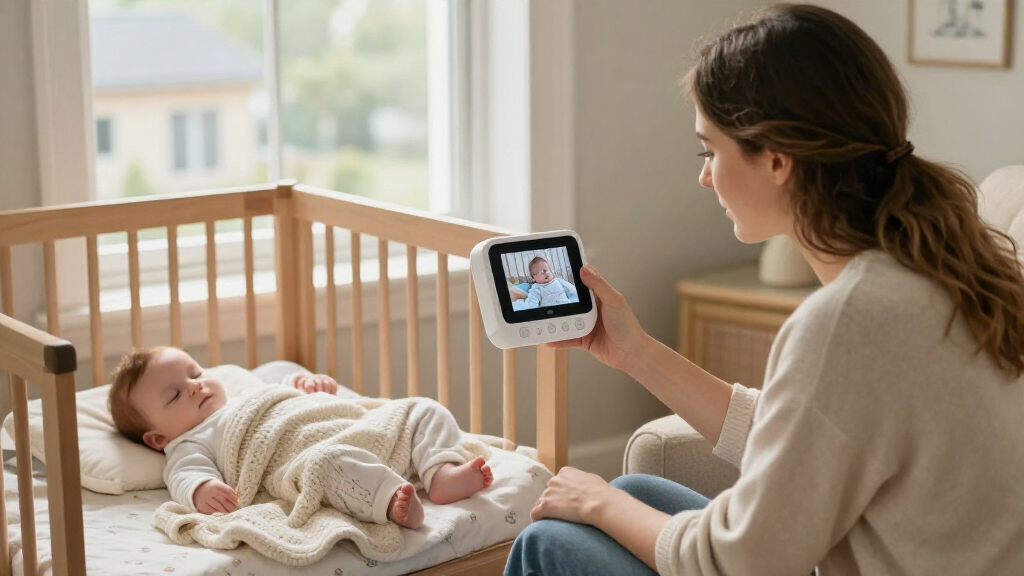

Choosing a video baby monitor is less about finding the longest feature list and more about deciding where and how you want to watch. A dedicated local monitor pairs a camera with its own handheld parent unit; a Wi-Fi monitor sends video through your home network to a phone app, and some models also include a separate screen. The main tradeoff is straightforward: local systems tend to be simpler and usable without internet, while Wi-Fi systems can let you check the nursery from outside the home and share access more flexibly.

Turn the school run and nap time into listening time
- Thousands of audiobooks, podcasts and originals
- Listen on your phone, tablet or Echo — also offline
- Cancel anytime
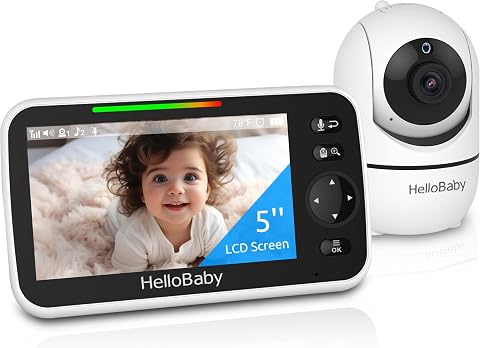
HelloBaby No WiFi Baby Monitor Camera and Audio HB6550, 5" Video Screen
- ✔ Display: 5-inch color screen
- ✔ Connection: 2.4 GHz FHSS; no Wi-Fi required
- ✔ Camera movement: 355° pan, 120° tilt

HelloBaby HB6550Plus 6-Inch No-WiFi Video Baby Monitor
- ✔ Display: Listed as 6 inches; also described as 5.5 inches
- ✔ Connection: 2.4 GHz FHSS; no Wi-Fi required
- ✔ Camera movement: 355° pan, 120° tilt

GoodBaby 5-Inch Baby Monitor with Camera and Audio, No Wi-Fi
- ✔ Display: 5-inch IPS screen
- ✔ Video resolution: 480p
- ✔ Connection: 2.4 GHz FHSS; no Wi-Fi
That difference matters in daily use. If you want a screen that stays ready on a nightstand, a direct connection, and fewer app or account steps, a dedicated local system is usually the better fit. If you need to check in while away, want phone alerts, or value features such as recorded clips, a Wi-Fi model may justify the extra setup and security responsibilities. The comparisons below focus on the criteria that change the buying decision, rather than treating either type as universally better.
At a Glance
| Criteria | Dedicated local video baby monitor | Wi-Fi video baby monitor | Winner |
|---|---|---|---|
| Remote viewing | Usually limited to the paired parent unit and local connection | Usually available through an app wherever a secure internet connection is available | B |
| Internet independence | Works without home internet, subject to its local link and power | Remote access depends on working home internet, power, and the service or app | A |
| Privacy and access control | No cloud account is needed for basic viewing; radio links still require sensible device security | Account security, app permissions, network security, and cloud practices matter | A |
| Everyday convenience | Handheld screen is ready without unlocking a phone or opening an app | Phone access is flexible, but requires an app, charged phone, and suitable notification settings | A |
| Alerts and extra features | Often offers basic sound, motion, or temperature alerts; features vary by model | May add activity zones, sound or motion alerts, clip history, or subscriptions; availability varies | B |
| Range and reliability | Depends on the monitor’s local signal, home layout, and interference | Can work across distance when both internet connections and services are available; local Wi-Fi still matters | Depends |
| Cost and value | Often a straightforward one-time hardware purchase | May cost more upfront or add subscription charges for certain features | Depends |
HelloBaby No WiFi Baby Monitor Camera and Audio HB6550, 5" Video Screen
The HelloBaby HB6550 earns our top spot by balancing the core video-monitoring needs without making one narrow feature do all the work. Its 5-inch color display is paired with remote 355° pan and 120° tilt, so caregivers can reposition the camera from the parent unit instead of accepting a fixed view. Two-times digital zoom and infrared night vision add useful options for checking a sleeping child without turning on room lights.Its strongest advantage over the GoodBaby SM663 is expansion to as many as four cameras, which gives families more flexibility if they want coverage in multiple rooms. Like both other picks, it avoids Wi-Fi and app setup through a dedicated FHSS connection. The stated battery life of about 30 hours is appealing for moving around the house or travelling, although that figure should not be confused with a guarantee under every screen-use pattern. The camera still needs a power connection, and the product notes that maximum range depends on a clear line of sight.We would choose this over the HB6550Plus when camera expansion matters more than having the largest stated screen. The tradeoff is that its 5-inch display is the smallest listed in this group, and it does not include the GoodBaby’s feeding timer or the Plus model’s audio-only mode. It makes the most sense for buyers who want an adaptable, straightforward video system; those who need remote viewing over the internet should look elsewhere.
Pros:
- Remote 355° pan and 120° tilt with 2× digital zoom
- Supports expansion to up to four cameras
- Stated battery life of about 30 hours
- Infrared night vision and two-way audio
Cons:
- The 5-inch display is smaller than the HB6550Plus’s stated screen
- Maximum range depends on a clear line of sight and home conditions
- Camera requires power and the unit is not described as water-resistant
Best for: Families wanting a dedicated no-Wi-Fi video monitor with remote camera control and room to add cameras.
Not ideal for: Caregivers who want a larger screen, internet-based viewing, or a cordless camera.
Bottom line: We recommend the HB6550 as the most flexible all-round video monitor here, especially for households that may add cameras later.
“We recommend the HB6550 as the most flexible all-round video monitor here, especially for households that may add cameras later.”
HelloBaby HB6550Plus 6-Inch No-WiFi Video Baby Monitor
If being able to see more of the picture at once is the priority, the HelloBaby HB6550Plus is the most screen-focused choice in this lineup. Its display is described as 6 inches, although product information also lists it as 5.5 inches. That inconsistency is worth resolving before purchase if screen size is the deciding factor. Either way, it is positioned as a larger-screen alternative to the HB6550’s confirmed 5-inch display.The Plus keeps the essentials that make the other models useful as no-Wi-Fi video monitors: remote pan and tilt, infrared night vision, two-way audio, temperature monitoring, and a dedicated parent display. It adds audio-only mode, a sound-level LED indicator, and a feeding timer. Audio-only mode can be helpful when caregivers do not need the screen active, while the indicator provides a quick visual cue that sound is being detected. Its stated display battery range is 18–33 hours, but the wide range makes it less straightforward to compare with the HB6550’s roughly 30-hour claim or GoodBaby’s mode-specific figures.The clearest compromise is support for only two cameras, half the HB6550’s stated maximum. It is therefore less attractive for households planning broader multi-room coverage. Choose it over the GoodBaby if the larger stated screen and listening-focused extras are more important than feeding alarms or a clearly specified 480p resolution. Skip it if you need a certain screen measurement or want capacity beyond two cameras.
Pros:
- Larger stated display than the HB6550, though the exact size is inconsistent in the supplied information
- Remote pan and tilt with infrared night vision
- Includes audio-only mode, a sound-level indicator, and feeding timer
- No Wi-Fi or app required
Cons:
- Product information describes the screen as both 5.5 and 6 inches
- Expansion is limited to two cameras, versus four for the HB6550
- Battery life is stated as a broad 18–33-hour range
Best for: Caregivers who prefer a larger parent display, audio-only listening, and a dedicated no-app connection.
Not ideal for: Households that need support for more than two cameras or require an unambiguous display-size specification.
Bottom line: The HB6550Plus is our larger-display pick, provided its screen-size ambiguity and two-camera ceiling fit your plans.
“The HB6550Plus is our larger-display pick, provided its screen-size ambiguity and two-camera ceiling fit your plans.”
GoodBaby 5-Inch Baby Monitor with Camera and Audio, No Wi-Fi
The GoodBaby SM663 is the most routine-oriented option here. Its feeding timer alarm is a useful distinction from the standard HB6550, and VOX mode lets the monitor respond to sound rather than keeping the display active continuously. The stated runtime reaches up to 30 hours in VOX mode, but falls to up to 10 hours with the screen on. That difference matters: buyers who want a constantly visible video feed should compare the screen-on figure, not rely on the longer mode-specific claim.For viewing, the SM663 offers a 5-inch IPS display, remote 355° pan and 120° tilt, and 2× zoom. It shares the no-Wi-Fi 2.4 GHz FHSS approach, two-way audio, infrared night vision, temperature sensing, and eight lullabies with the HelloBaby HB6550. Its supplied video resolution is 480p, making detail a more explicit limitation than in the other product descriptions. The camera also needs corded power, so VOX improves the parent unit’s battery use but does not make the full setup wireless.Compared with the HB6550, GoodBaby gives up camera capacity—its expansion limit is not specified in the supplied details—while adding a feeding reminder. Compared with the HB6550Plus, it has a clearly stated 5-inch screen but lacks audio-only mode and the sound-level LED indicator. We would pick it when feeding schedules and sound-triggered monitoring matter more than screen-on endurance. If continuous viewing is your priority, the shorter stated runtime with the display on is a reason to consider the HB6550 instead.
Pros:
- Feeding timer alarm adds a routine-focused feature
- VOX mode offers up to 30 hours of stated battery life
- Remote pan, tilt, and 2× zoom
- No Wi-Fi connection required; includes two-way audio and infrared night vision
Cons:
- Listed 480p resolution offers less detail than buyers seeking sharper video may want
- Stated battery life drops to up to 10 hours with the screen on
- Camera needs corded power and expansion capacity is not specified
Best for: Caregivers who want feeding reminders and a VOX mode to conserve the parent unit’s battery.
Not ideal for: Buyers who expect all-day continuous screen use, need higher specified video resolution, or want a confirmed multi-camera capacity.
Bottom line: GoodBaby is the better fit for scheduled feeds and VOX use, but the HB6550 is a stronger choice for longer screen-on viewing and defined camera expansion.
“GoodBaby is the better fit for scheduled feeds and VOX use, but the HB6550 is a stronger choice for longer screen-on viewing and defined camera expansion.”
As an Amazon Associate we earn from qualifying purchases.
Key Differences
The strongest reason to choose Wi-Fi is access beyond the home. A dedicated local monitor is designed for viewing on its paired parent unit, so it is not a substitute for checking the nursery from work or while traveling. Wi-Fi can fill that gap, but remote viewing is only as dependable as the camera’s power, home internet, app service, and the connection on the phone receiving the video. Buyers should treat remote access as a useful capability with dependencies, not as a guarantee of uninterrupted monitoring.
For staying at home, local systems often have the more convenient routine: pick up the screen and look. They also avoid a cloud account for basic viewing and can keep working if broadband is down. Wi-Fi models trade that simplicity for smartphone access and, on some models, richer alerts or saved clips. These features can be helpful, but buyers should check whether they are included, whether they require a subscription, and how the manufacturer handles access and software support. In practice, the best choice is the one that matches the monitoring routine you will actually use—not the one with the longest spec sheet.
Detailed Comparison
Remote viewing (Wi-Fi video baby monitor wins — major)
Wi-Fi wins by a major margin if you want to see the nursery while away from home. App-based access can make a phone the viewing screen wherever the camera and phone have suitable internet connections. A dedicated local monitor generally connects to its included parent unit, so it suits people who stay within the home or nearby range. Some products combine local and Wi-Fi viewing, but that hybrid capability must be checked model by model.
The practical question is whether remote access solves a real need. If another caregiver needs to check in while you are out, Wi-Fi has clear value. If you mainly want to see and hear the baby from another room, the additional remote capability may not be worth the extra setup.
Internet independence (Dedicated local video baby monitor wins — moderate)
Dedicated local monitors win by a moderate margin. Their basic viewing connection does not require home broadband, so a router outage need not stop the parent unit from receiving the camera feed. The devices still need power, and walls, distance, or interference can disrupt their local signal. Wi-Fi models generally need the home network for app viewing, and remote checks also depend on internet service and the app’s supporting systems.
This difference matters in homes with unreliable broadband or for parents who do not want monitoring tied to a router. Wi-Fi can still be suitable if the network is stable, but it has more points of failure. Check whether a particular Wi-Fi model includes a separate parent unit or a local fallback mode before assuming it does.
Privacy and access control (Dedicated local video baby monitor wins — moderate)
Local systems have a moderate advantage for straightforward privacy. A basic dedicated monitor can provide viewing without creating an online account or sending video through a cloud service. That reduces the number of online credentials and services involved, though a local radio connection is not automatically risk-free; use the manufacturer’s security guidance and keep equipment in good working order.
Wi-Fi cameras add account and network considerations. Use a unique password, enable available two-factor authentication, install updates, and limit access to people who need it. Cloud storage and sharing can be convenient, but read the model’s privacy and retention details. Families comfortable managing these settings may prefer Wi-Fi’s flexibility; those seeking fewer connected services may prefer local viewing.
Everyday convenience (Dedicated local video baby monitor wins — moderate)
A dedicated local monitor usually wins by a moderate margin for a stay-at-home routine. Its handheld screen is purpose-built: it can sit nearby and show the nursery without unlocking a phone, opening an app, or managing phone notifications. The tradeoff is carrying and charging another device, and the parent unit may have a smaller screen than a phone.
A Wi-Fi monitor is convenient when the phone is already with you or when several caregivers need app access. It can also mean one less dedicated screen to keep charged. But phone calls, battery-saving settings, app sign-outs, and notification choices can interrupt that convenience. Think about who will watch the feed and whether a dedicated screen or a shared phone workflow suits the household better.
Alerts and extra features (Wi-Fi video baby monitor wins — moderate)
Wi-Fi models often win by a moderate margin, but the advantage is model-dependent. Apps may offer customizable motion or sound notifications, activity zones, clip history, or access for multiple caregivers. Some of these features may require a subscription, and alert behavior varies in accuracy and usefulness. A standard local monitor may focus on live video, two-way audio, night vision, and basic alerts rather than storing or organizing events.
More features do not automatically make monitoring better. Alerts can be distracting if they are too sensitive, and recorded video may create extra privacy and storage questions. Choose Wi-Fi for a specific feature you will use, and confirm its ongoing cost. If live viewing and sound are enough, paying for functions you will leave disabled is poor value.
Range and reliability (moderate difference)
Neither type wins across every home, so this is a genuine tie. Local monitors can lose signal across thick walls, multiple floors, or long distances, and specifications measured in open space may not reflect a real house. Wi-Fi cameras depend on wireless coverage where the camera is placed, while remote viewing adds reliance on broadband and service availability.
For a small home with a strong router, Wi-Fi may be reliable and flexible. For a larger home, a local system with a suitable range—or a Wi-Fi setup with strong coverage—may perform better depending on the layout. Read range claims as starting points, check return terms, and test the connection in the actual nursery. No product type removes the need to verify coverage.
Cost and value (moderate difference)
Value depends on whether remote access and paid features will be used. A local monitor is often the better value for basic in-home viewing because it can meet that need with a single hardware purchase and no app subscription for core use. Wi-Fi models can cost more, and clip storage or advanced services may add recurring fees.
Paying more for Wi-Fi makes sense when remote checks, multiple-user access, or a particular alert feature has practical value to your family. It is hard to justify the premium if the camera will only be watched from inside the home and the extra features will remain unused. Compare the full cost over the period you expect to use it, not just the price on the box.
Dedicated local video baby monitor: Pros and Cons
Pros:
- Basic viewing can work without home internet
- Dedicated parent screen is quick to use
- No online account is generally needed for basic local viewing
- Often a cost-effective choice for in-home monitoring
Cons:
- Usually cannot provide remote viewing when you are away
- Local signal can be affected by distance, walls, or interference
- Requires charging and keeping track of a separate parent unit
- May offer fewer app-based alerts, sharing tools, or clip features
Wi-Fi video baby monitor: Pros and Cons
Pros:
- Can support viewing away from home through a phone app
- Convenient for caregivers who already use their phones
- May provide flexible alerts, sharing, and event features
- Can fit households that want remote access and app-based controls
Cons:
- Viewing depends on power, network access, and app or service availability
- Requires attention to account, password, update, and privacy settings
- Some recording or advanced features may require a subscription
- Phone notifications and battery settings can complicate routine use
Who Should Choose What
Choose Dedicated local video baby monitor if:
- You mainly monitor from inside the home and want a dedicated screen that is ready at a glance.
- Your internet service is unreliable, or you prefer basic monitoring that does not depend on home broadband.
- You want to limit accounts and cloud-connected services and do not need remote viewing.
- You value simple operation over app controls or saved clips.
Choose Wi-Fi video baby monitor if:
- You need to check the camera while away from home and accept the internet and service dependencies.
- More than one caregiver needs flexible access through phones.
- You have a specific use for app alerts, activity history, or sharing features and have checked any subscription costs.
- Your home network is reliable where the camera will be installed, and you are willing to manage account security.
Skip both if: Skip both types if you need a monitoring setup with professionally managed reliability, or if neither the local signal nor your home network can cover the nursery reliably. Also avoid treating any consumer video monitor as a replacement for safe sleep practices or direct supervision.
Value for Money
For most families who only need a live picture and sound while at home, a dedicated local monitor is the stronger value. It gives those buyers the core function without paying extra for remote access they may rarely use, and basic viewing can avoid subscription costs. That does not mean every local model is inexpensive or that every Wi-Fi monitor charges a fee; compare specific models and included features.
Pay more for Wi-Fi when being able to check in from outside the home is a real part of your routine, or when a paid feature solves a clear need. Before buying, confirm whether the camera also works locally, whether video history is included, how many people can access the app, and what happens if the service ends. A higher upfront cost is reasonable for useful flexibility; recurring charges for features you do not need are not.
Final Verdict
For families who monitor from home, choose a dedicated local video baby monitor unless you have a clear reason to need phone-based remote access. Its ready-to-use parent screen, independence from broadband for basic viewing, and simpler account requirements make it the more practical default. It is not automatically more reliable in every house, so check the range and test the connection where the camera will sit.
Choose a Wi-Fi monitor if checking the nursery while away is the deciding requirement, or if its app features offer enough value to justify the added network and account responsibilities. The biggest deciding factor is not image quality or the number of features; it is whether you need access beyond the home. If you do, Wi-Fi is worth paying for. If you do not, a dedicated local system is usually the better buy.
Frequently Asked Questions
Can a Wi-Fi baby monitor work if the internet goes down?
Remote viewing through an app generally needs an internet connection. Some models may offer local viewing, a separate parent unit, or another fallback, but this varies. Check the exact model’s instructions rather than assuming Wi-Fi means it can keep streaming during an outage.
Are local video baby monitors more private than Wi-Fi models?
They can involve fewer online services because basic viewing often does not require a cloud account. That is a privacy advantage, not a guarantee of security. Wi-Fi models can be used with sensible safeguards: set a unique password, enable available two-factor authentication, install updates, and review who has access.
Is a Wi-Fi baby monitor worth paying more for?
Yes, if remote viewing or a specific app feature will change how you use the monitor. If you only need a live feed while at home, the extra cost and possible subscription charges are usually hard to justify. Check which features are included before comparing prices.
Which type is better for a large house?
Neither type is automatically better. Local systems depend on their direct signal through the home; Wi-Fi systems depend on coverage near the camera and, for remote viewing, a working internet connection. The layout, walls, floors, and router placement matter more than the category label, so check coverage in the nursery and review the return policy.